The immediate answer: If your phone, disk, USB flash drive, or memory card has come into contact with water, turn it off immediately and do not switch it on again „just to test". Do not connect a charger, do not dry it with a hairdryer, and do not put the device in rice. If your data is important, the key is prompt disconnection from power, disassembly, cleaning of electrolyte, and only then safe data reading.
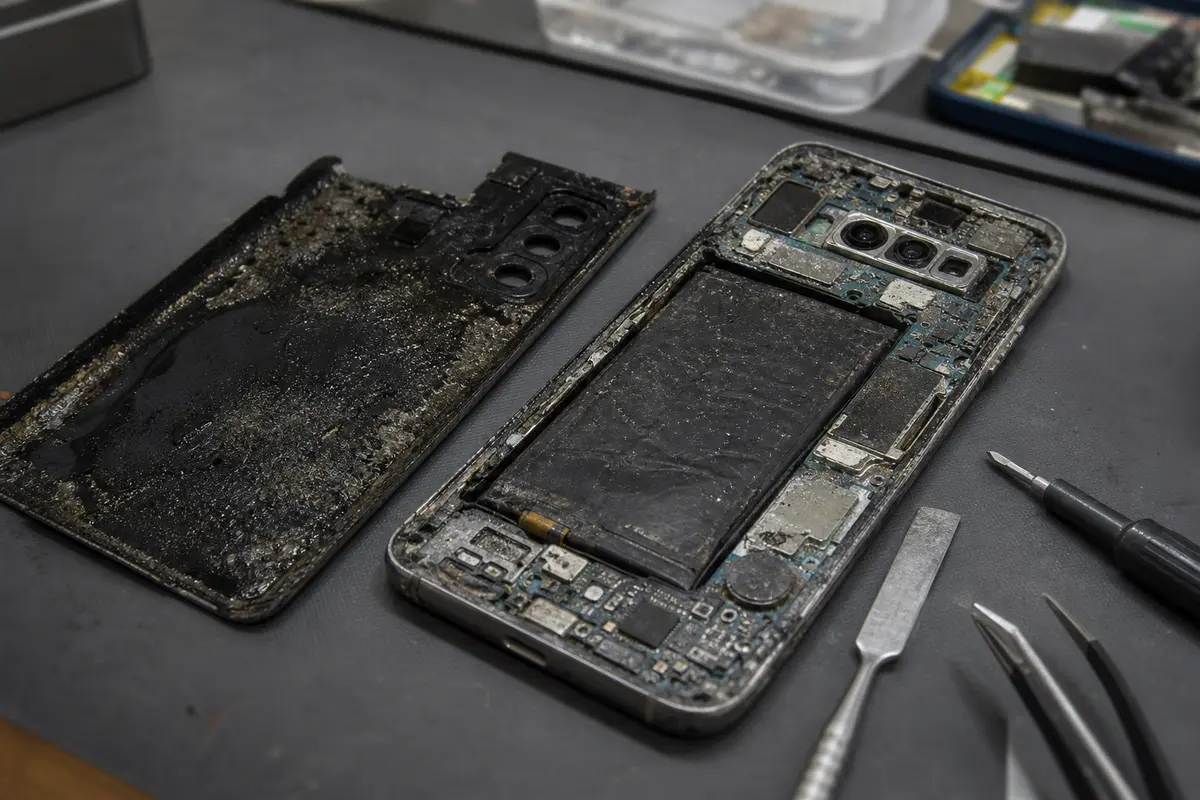
When a phone falls into water, most people worry about whether it will still switch on. With data recovery, it is the other way round. We do not care whether the device will continue to function as a phone. We care whether your photos, videos, contacts, accounting data, or project files are preserved and whether we will destroy them permanently with another attempt to power on.
Water itself is rarely the biggest enemy. What is dissolved in the water is worse: minerals, sugar, salt, coffee residue, tea, wine, flood mud, or cleaning chemicals. As soon as liquid reaches the board and there is a battery or residual voltage present, corrosion and electrolysis begin. This is why a device sometimes dies several hours after being wet and why a seemingly „dry" phone can stop responding completely after two days.
What Matters in the First Minutes
The best procedure is dull, but it works:
- Switch off and disconnect from power. For a phone, do not connect a charger. For a laptop, unplug the adapter. For an external drive, disconnect both USB and the power supply.
- Do not attempt to test. One power-on „to see if it still works" can burn out the PMIC, SSD controller, USB bridge, or HDD electronics.
- Do not heat. A hairdryer, oven, heater, or sunlight is not drying for electronics. Heat accelerates corrosion, and airflow often pushes liquid under BGA chips.
- Do not put it in rice. Rice will not draw liquid out from under covers and chips. You only lose time and introduce starchy dust into the connectors.
- Decide on the priority: data or the device. If data is the priority, have an expert assess whether it is safer to repair the board or read the memory outside the device.
Time does not guarantee success. Recovery sometimes works even after weeks. However, the first 24 hours fundamentally reduce the extent of corrosion and therefore the cost and risk of the intervention.
Why Rice Does Not Work
The rice myth persists because, with older button phones, it was sometimes enough to dry out moisture in the connector or under the keypad. A modern phone, however, is a different construction. It has a multilayer mainboard, BGA chips, shielding cans, a bonded display, a tight frame, and miniature connectors. Liquid gets into places rice has no chance of reaching.
Moreover, the main problem after liquid ingress is not just moisture. It is the conductive residue left after the liquid evaporates. Sweet tea, coffee, beer, salt water, or dirty floodwater leaves a film on the board that conducts electricity and corrodes metal. A phone may look dry after three days in rice, but an aggressive coating remains under the chip. Upon power-on, it acts like a short circuit.
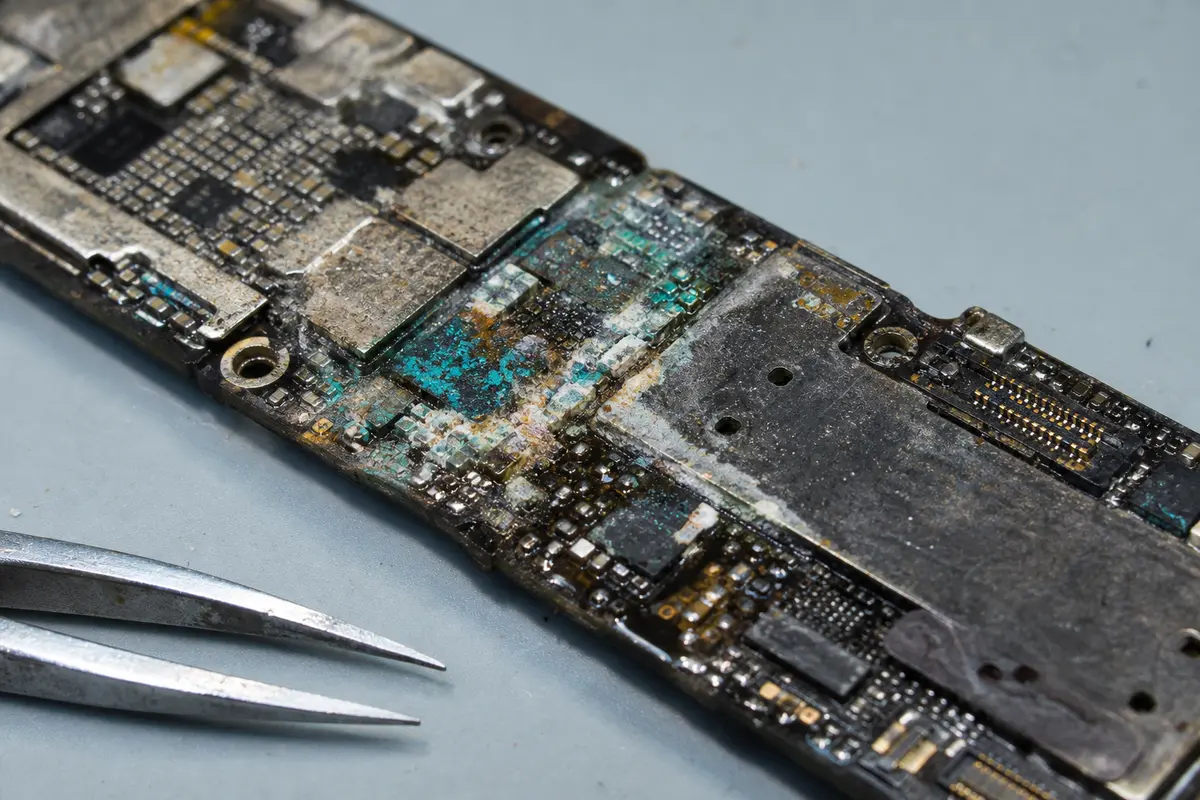
The correct procedure is disassembly, battery disconnection, visual and electrical inspection, cleaning with isopropyl alcohol or an ultrasonic cleaner depending on the board type, and only then measuring the power rails. If the phone holds valuable data, there is no sense in gambling.
Hypothetical scenario: a phone after liquid damage
This is a hypothetical example, not a customer case: a phone stops responding after a sugary drink is spilled on it, and recent photos are missing from the available cloud backup. Further attempts to start or charge it may worsen corrosion, so the device remains switched off.
The first step is a professional diagnostic: safely disconnecting the battery and assessing liquid damage and the board’s power circuits. Only the findings can show whether the original board could be repaired enough to unlock the phone and make a backup. On an encrypted phone, the original processor and access credentials may be essential for readable data.
Removing a UFS chip is considered only after assessing encryption and the availability of keys. Reading the chip alone yields raw contents, not automatically readable photos. Neither the recoverable extent nor the outcome can be promised in advance; the customer approves any further work and its price after the diagnostic.
Phone after Water: When Data Can Be Saved
The chances depend on four things:
- Condition of the memory. In modern phones, raw contents reside in a UFS/eMMC chip. A physically healthy chip matters, but without the necessary encryption keys it does not by itself guarantee readable files.
- Encryption and security. Some phones bind data to the processor, Secure Enclave, Knox, or a user passcode. You cannot simply „read the chip" and expect it to work.
- Extent of corrosion. If a short circuit destroyed the power supply but the memory is alive, chances are good. If the liquid has affected the memory, processor, and surrounding BGA joints, the work is more complex.
- Attempts before delivery. Charging, powering on, rice, hairdryers, and amateur opening typically increase the damage.
For iPhones, Samsungs, and other modern phones, we therefore first assess the board and data path. The paid diagnostic itself does not include or promise physical chip reading. Often, the original board must be revived long enough to make a backup. Chip-off is considered only after checking whether the device’s encryption and available keys could yield readable data. No universal home guide exists, as each phone generation has different security and memory architecture.
Disk, USB Flash, or NAS after Water
For disks and flash media, the procedure differs from a phone, but the „do not power on" rule applies equally.
An external HDD after liquid ingress should never be connected to a computer. If water has entered the drive, it can carry contaminants between the heads and platters. If it only entered the USB enclosure, it can burn out the electronics or bridge. You cannot reliably tell from the outside.
SSDs and USB flash drives have a controller, NAND memory, and power rails. After water, the electronics often fail, but the memory chips may remain readable. It is essential not to worsen the condition with additional current.
A NAS or RAID after flooding should be left switched off, and above all, do not swap the disks. With RAID, label the positions of the disks, photograph the bays, and do not initiate a rebuild. When dealing with water and an array simultaneously, any change of order complicates reconstruction.
We have a separate procedure page for disks at external disk data recovery and for larger arrays at RAID and NAS data recovery.
What to Bring or Send to Us
Bring or send the entire device as it is. For a phone, do not include the charger unless requested. For an external drive, include the USB cable only if it is non-standard. For a NAS/RAID, it is important to supply all disks and preserve the order.
In the description, state:
- when the spill or flooding occurred,
- what substance the device was affected by (water, coffee, tea, salt water, flood),
- whether the device was switched on or charged after the liquid ingress,
- what exactly you need rescuing (photos, accounts, projects, specific folders),
- whether a cloud or other backup exists.
If you are sending the device by courier, use the guide how to send a hard drive, SSD, or phone. For a flooded device, a sturdy box, padding on all sides, and no other loose items in the parcel is best.
Price and Diagnostics: Keeping Our Pages Consistent
For selected HDDs, SSDs, RAID arrays, NAS devices and USB media, the first indicative diagnostic is normally free. We quote the terms for memory cards and other devices separately. No recovery, no fee applies to the price of standard recovery, not to agreed paid work such as targeted searches for, or recovery of, specifically requested deleted or other individual files. See our data recovery terms.
For phones and tablets, it is different. Dismantling, battery disconnection, cleaning, power rail measuring, and data path verification are manual labour, even if the data ultimately cannot be obtained. Diagnostics of a mobile phone or tablet cost 1 210 Kč including VAT (1 000 Kč excluding VAT). If we then carry out a successful recovery, the diagnostics are included in the final price of the recovery. If the customer does not go ahead or recovery is not possible, the diagnostics performed are charged separately. See the data recovery price list.
Quick FAQ
My phone fell into water but is still on. Should I leave it switched on?
No. Turn it off as soon as possible. The fact that it is still on does not mean corrosion or a short circuit is not progressing inside. The longer the board is under power, the higher the risk.
Can I at least charge the phone to make a backup?
After liquid ingress, no. Charging is one of the worst attempts because you are sending a higher current into a wet or corroded board. If the phone has not switched itself off, switch it off and address the backup only after inspection.
Is there a difference between clean water and salt water?
Yes. Salt water, sweat, lemonade, coffee, tea with sugar, and floodwater are significantly worse than clean water. They contain ions and contaminants that accelerate corrosion and short circuits.
Can both the phone and the data be saved?
Sometimes yes, but they are not the same goals. If data is most important, it may be safer to sacrifice the device and read the memory directly. If data is backed up and you mainly want the phone repaired, a different procedure is chosen.
If you have a wet phone, a liquid-damaged disk, or a device after a flood, do not start home experiments. Get in touch via contact, call +420 775 556 063, or write to zachranadat@ithope.cz. Our lab is in Brno-Židenice, and we accept cases in person and by courier from all over the Czech Republic.
Where to find us
ITHOPE is a company based in Brno, Czechia: we do data recovery from disks, RAID and NAS, PC and laptop service and IT for business, all in our own lab at Viniční 3587/216, 615 00 Brno.
Phone +420 775 556 063 (24/7 line). You can bring the device in person, or send it by courier (Zásilkovna, PPL).