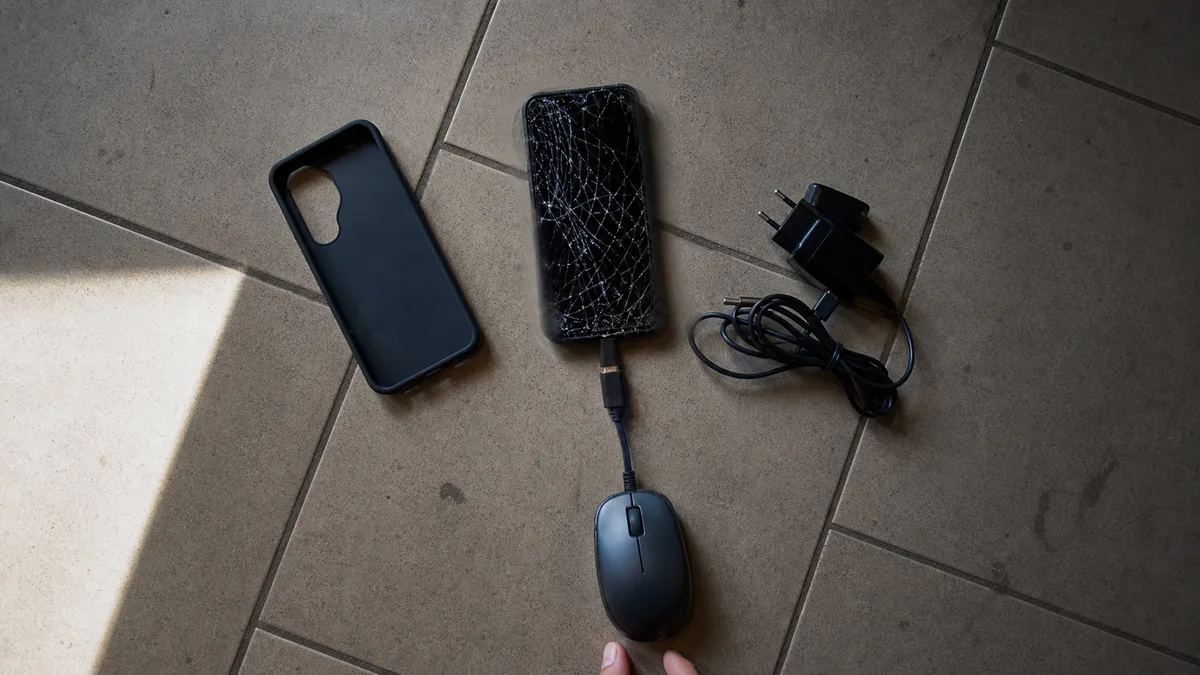
The short answer: If your phone has a broken screen or will not turn on, stop trying to „revive" it—every additional attempt to start it, charge a damaged board, or flash the firmware reduces the chances of recovering your data. The easiest case is a broken screen on an otherwise working phone: replacing the screen or connecting an OTG mouse can provide access to the data if you know the PIN. However, USB debugging cannot be enabled retroactively on a locked phone, and unlocking the bootloader erases the data. If the phone will not turn on, recovery depends on the condition of the motherboard and memory chip—and that calls for professional diagnostics, not a one-size-fits-all forum guide.
A screen shattered by a fall onto a tiled floor and a phone that simply refuses to start one morning are the two most common reasons people seek phone data recovery outside the „dropped in water" scenario. Water damage and oxidation are covered in a separate article about submerged devices and first aid; this article covers everything else: mechanical damage, a phone that will not turn on, a locked phone, and when laboratory-level reading of eMMC/UFS memory makes sense.
One rule applies to every scenario: with Android, the hardware is not the only deciding factor—encryption matters too. A method that worked on a ten-year-old phone may not work at all on a modern one, and anyone unaware of that can permanently destroy the data with a single tap in recovery mode.
First, determine what actually happened
Three different situations require three different approaches:
- The phone is working, but the screen is broken. It vibrates, rings, and receives notifications, but the display is blank or the touchscreen does not respond. This is the best starting point.
- The phone will not turn on. It does not respond to the power button or charger, or perhaps only flashes an LED or repeatedly displays the startup logo in a boot loop. In this case, the motherboard is the deciding factor.
- The phone works, but it is locked and nobody knows the PIN. This commonly happens with a deceased relative’s phone. It is the most difficult case—and it is only fair to say so upfront.
One rule applies to all three: if the phone contains a microSD card, remove it and set it aside. Photos stored on the card can be read separately using a card reader—unless the card was formatted as „internal storage" (adoptable storage), in which case it is encrypted with a key tied to that specific phone and cannot be read without it.
Broken screen: the easiest case to resolve
If the phone still works after a fall and only the display is unusable, the data has not gone anywhere. The question is how to access it when you cannot confirm prompts on the screen.
- The screen is black and the touchscreen status is unknown: the most reliable option is a screen replacement. On common models such as the Samsung Galaxy A and Xiaomi Redmi series, this is a routine repair, after which you can copy the data yourself. AMOLED panels on more expensive phones cost more, but replacement is still cheaper than laboratory work on the memory.
- The screen lights up, but the touchscreen does not respond: connect an ordinary mouse using a USB-C adapter with OTG support. You can use the cursor to enter the PIN, unlock the phone, enable file transfer, and create a backup.
- The touchscreen works, but nothing is visible: some phones can output video over USB-C to a monitor or television using DisplayPort Alt Mode—for example, Samsung phones that support DeX. Be aware that many budget and mid-range models have no USB-C video output at all; having a USB-C port does not automatically mean it can carry video.
What does not work is connecting the phone to a computer and „simply copying the files." Until it is unlocked, Android presents itself only as a charging device. File transfer mode (MTP) must be confirmed on the screen of an unlocked phone. Without the PIN and a working display, you cannot access the data over a cable. This is not an arbitrary restriction imposed by the manufacturer; it is the same protection that keeps your photos safe if the phone is stolen.
Myths about USB debugging
Three pieces of advice that do not work on modern Android devices keep circulating on forums—and it is worth explaining why.
„Enable USB debugging and download the data through ADB." USB debugging is an option hidden in the developer settings. It can only be enabled manually on the screen of an unlocked phone. Even when ADB is enabled, you must confirm the fingerprint of the specific computer’s key on the phone’s display. This route simply does not exist for a locked phone or one without a working screen. Tools such as scrcpy, which mirrors the screen to a PC, also depend on ADB and therefore cannot help unless debugging was enabled in advance.
„Flash a custom recovery such as TWRP and extract the data from there." Installing a different recovery requires an unlocked bootloader. Unlocking the Android bootloader deliberately erases all user data. A factory reset is built into the process on Pixel, Samsung, and Xiaomi devices—the latter also imposes a waiting period through Mi Unlock. Advice to „unlock the bootloader to recover the data" is therefore effectively a guide to destroying it.
„Select wipe in recovery mode and it will fix the problem." The only recovery option that substantially affects the data is a factory reset. On an encrypted phone, this discards the encryption keys, making the data immediately and permanently inaccessible—no laboratory can reconstruct it afterward. If a phone enters a boot loop following an update, the data is often still intact; the last thing you want to do is try a reset „just in case."
The common denominator is encryption. File-based encryption is mandatory on phones launched with Android 10 or later, and in practice, the vast majority of phones had already been encrypted for several generations before that. The keys are unlocked using a combination of your PIN and a key stored in a secure part of the hardware—TrustZone, the Titan M chip on Pixel devices, or Knox Vault on newer Samsung phones. That is why the honest answer to „we have our late grandfather’s phone but do not know the PIN" is that the options are extremely limited without the PIN, password, or access to the signed-in Google account. No reputable service should promise otherwise.
The phone will not turn on: what is happening and what not to do
When a phone „will not turn on," one of the following is usually responsible:
| Symptom | Most common cause | What it means for the data |
|---|---|---|
| No response, even when connected to a charger | Faulty battery, charging circuit, or a short circuit on the motherboard, often after a fall | The memory is usually intact; the motherboard must be repaired |
| Only an LED or vibration response, but no picture | Faulty display, or the motherboard does not complete startup | Diagnostics are needed to distinguish a display fault from a motherboard fault |
| Boot loop (logo repeats indefinitely) | Failed update, software fault, or failing storage | The data is often intact; do not perform a factory reset |
| The computer detects the phone as an unknown device, such as Qualcomm 9008 | Damaged bootloader or storage | The processor is in service mode; this is a job for a laboratory |
| It works briefly after a fall and then shuts down | Loose connector, cracks in the motherboard, or a damaged battery | Do not keep trying; every startup may be the last |
What not to do when the data matters:
- Do not leave it charging overnight „to see if it helps." If a fall caused a short circuit on the motherboard, you are forcing current through an area that is overheating—the same principle applies as with a liquid-damaged device.
- Do not flash the firmware. Installing firmware with tools such as Odin, Mi Flash, or fastboot writes to the device, and some packages also overwrite the user data partition. This is a gamble when valuable data is involved. The same rule that applies to drives is explained in our article on SSD data recovery: never update the firmware on storage media containing data you need to recover.
- Do not disassemble the phone without experience. Adhesive construction, fragile flex cables, and batteries that can catch fire if punctured mean that an amateur disassembly can turn a repairable fault into an irreparable one.
The good news is that a dead phone usually does not mean dead data. The power circuitry, connector, or display most often fails while the memory chip containing your photos remains intact on the motherboard. Accessing it requires motherboard repair, however—not miracle software.
eMMC, UFS, and when laboratory recovery makes sense
A phone’s storage is a chip soldered to the motherboard: eMMC in older and less expensive models, and UFS in higher-performance phones—flagship models have used it since roughly the middle of the last decade. It cannot be removed like a drive from a laptop, which is why laboratory phone recovery differs from computer data recovery.
There are essentially three approaches:
- Motherboard repair. This is the most common and useful approach: locate and repair a short circuit, replace the charging circuit or power components, and get the phone to start at least once so the data can be copied normally using your PIN. For a modern encrypted phone, this is the primary recovery scenario.
- ISP/direct eMMC reading. On older motherboards, eMMC can be read through service points directly on the board without desoldering it. This works very well on phones from before widespread encryption because the chip can provide immediately readable data.
- Chip-off. The chip is desoldered and read using a specialist reader—with UFS, an adapter for the specific package is required. This may sound like a universal solution, but it has the same limitation as SSD recovery: the chip provides raw content, and if that content is encrypted with a key that never left the phone’s secure hardware, all you have is a perfect backup of meaningless noise. Chip-off is therefore a last resort on modern Android devices, typically used when the motherboard has been destroyed and the laboratory must determine what the specific model and operating-system version still allow.
In practical terms, the rule is simple: the newer the phone, the more data recovery depends on repairing the motherboard—and the more important it is not to damage it through further attempts at home.
Before paying for recovery, check your backups
Before ordering any service, spend ten minutes checking what has already been backed up—using another device, not the damaged phone:
- Photos: sign in at photos.google.com. If Google Photos backup was enabled, most of your gallery will usually be there.
- Contacts and calendar: visit contacts.google.com. Contacts saved to your Google account will automatically return when you sign in on a new phone.
- WhatsApp: WhatsApp backs up to Google Drive. Your chat history can be restored after you sign in on a new phone, provided backups were running.
- Phone backup: Google One or your account settings show when the device was last backed up.
In reality, the situation is often the same as with computers: „some kind of" backup exists, but the last few months are missing—and those months contain the photos you care about. If the phone still contains something that is not stored anywhere else, bring it in for a data recovery diagnostic. Diagnostics of a mobile phone or tablet cost 1 210 Kč including VAT (1 000 Kč excluding VAT). If we then carry out a successful recovery, the diagnostics are included in the final price of the recovery. If the customer does not go ahead or recovery is not possible, the diagnostics performed are charged separately. We will quote any recovery before it begins. No recovery, no fee applies to the price of standard recovery, not to agreed paid work such as diagnostics or targeted searches for specifically requested files. Our article on data recovery in Brno explains when it is worth delivering the device in person.
Prepare the following for the diagnostic:
- the phone’s PIN or unlock pattern—for a locked phone, mention this immediately because it changes the entire procedure;
- the Google account sign-in details, so backups can be checked and Factory Reset Protection (FRP) can be cleared after the repair;
- a list of priorities—which folders and apps matter most, such as the gallery, WhatsApp, notes, or an authenticator;
- details of exactly what happened and what has already been tried, including chargers, firmware flashing, or previous repair attempts.
How to avoid this next time
For many families, a phone is now the only place where photos of their children are stored. Enable Google Photos backup or the manufacturer’s equivalent, and check from time to time that it is actually running. The same rule applies to important phone data as to business storage: one copy is not a backup. The 3-2-1 principle is explained in our article about using an external HDD as your only backup.
If only one person in the family knows the PIN, store it in a sealed envelope or password manager as well. The most difficult data recovery cases are not technical—they are locked phones whose PIN died with their owner.
Frequently asked questions
Can data be recovered from a phone with a broken screen?
Usually, yes, and it is generally the least expensive scenario. If the phone still works and you know the PIN, replacing the screen or connecting an OTG mouse may be enough. Without the PIN, encryption makes the situation significantly more difficult.
Can USB debugging be enabled on a locked phone?
No. USB debugging must be enabled manually on an unlocked phone, and each computer must also be authorized on the phone’s display. Advice involving a custom recovery ultimately requires unlocking the bootloader—and that erases the data.
My phone will not turn on. Is the data gone?
Usually not. The battery, charging circuit, or display most often fails while the memory chip remains intact. Accessing the data requires motherboard repair; repeated startup attempts and firmware flashing make the situation worse.
Can chip-off recovery help if the motherboard is destroyed?
Yes, on older unencrypted phones—the data can be read directly from the eMMC chip. On modern Android devices with file-based encryption, the chip alone provides encrypted content, so motherboard repair is the primary approach and chip-off is a last resort.
How much does phone data recovery cost?
Diagnostics of a mobile phone or tablet cost 1 210 Kč including VAT (1 000 Kč excluding VAT). If we then carry out a successful recovery, the diagnostics are included in the final price of the recovery. If the customer does not go ahead or recovery is not possible, the diagnostics performed are charged separately. We quote any recovery before it begins. If standard recovery fails, you do not pay for that recovery; diagnostics and other agreed paid work remain chargeable even without a result. General pricing factors are covered in our article on how much disk data recovery costs.
Where to find us
ITHOPE is a company based in Brno, Czechia: we do data recovery from disks, RAID and NAS, PC and laptop service and IT for business, all in our own lab at Viniční 3587/216, 615 00 Brno.
Phone +420 775 556 063 (24/7 line). You can bring the device in person, or send it by courier (Zásilkovna, PPL).