
SSDs have no moving parts, but they have their own drama: firmware, garbage collection, wear-leveling, TRIM. When any of these breaks, the SSD typically „freezes" completely — and the user sees 0 B instead of 1 TB in the BIOS, or nothing at all. Bring or send the SSD to our Brno-Židenice lab: initial SSD diagnostics are free — we find out what can be recovered and quote before any work; you decide after that. In non-standard cases (the drive was opened by another service, overwriting/formatting, complex analysis) diagnostics cost 1 210 Kč including VAT (1 000 Kč excluding VAT) — we tell you in advance. Targeted search for a specific deleted file costs 1 210 Kč including VAT (1 000 Kč excluding VAT) (deducted if successful). Call us 24/7 at +420 775 556 063.
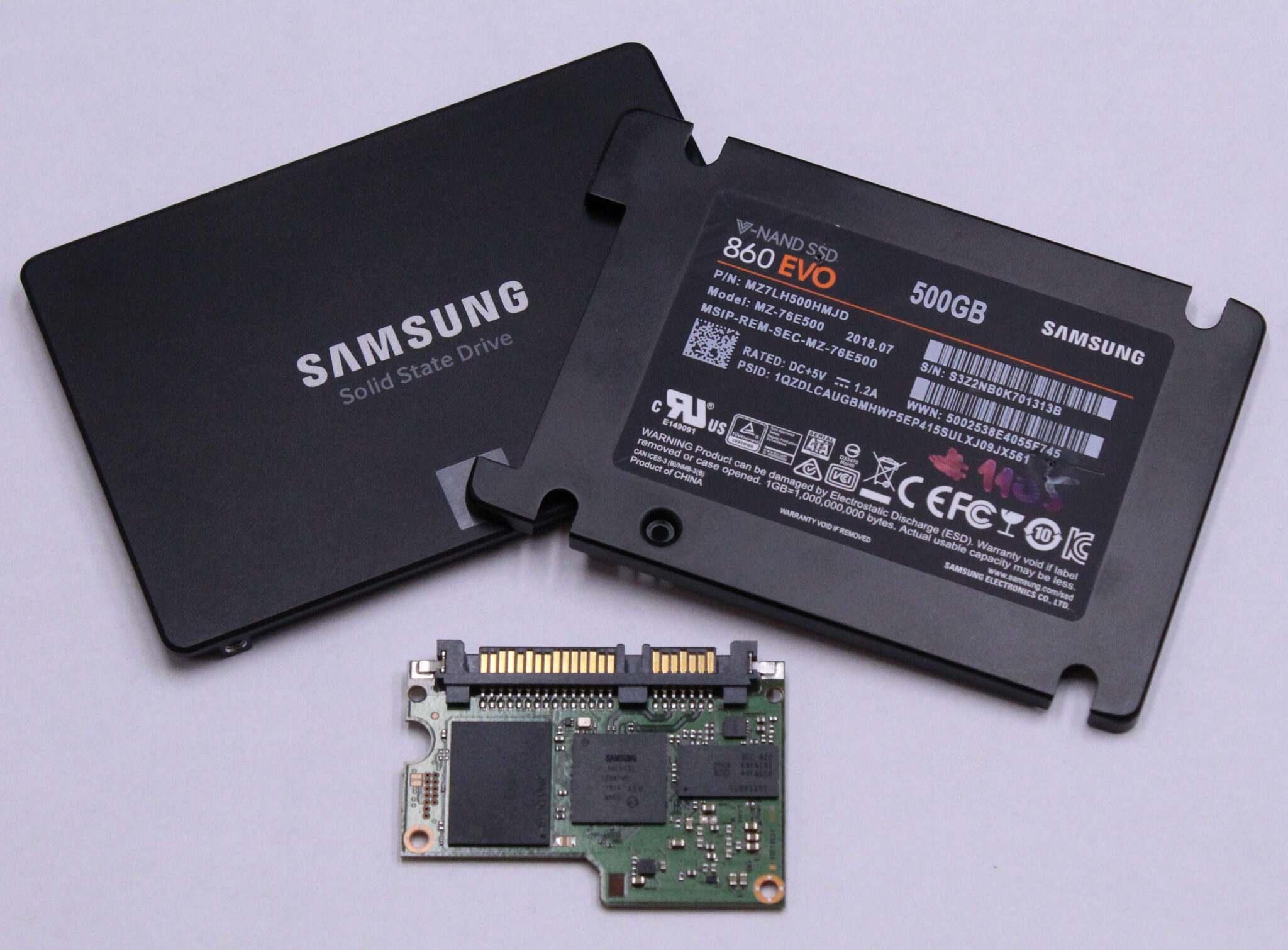
SSD types we work with
- SATA 2.5” — Samsung 860/870 EVO, Crucial MX500, Kingston A400, WD Blue/Green
- mSATA — legacy notebooks, Intel 525/535, Crucial M550
- M.2 SATA — ultrabook variants
- M.2 NVMe — Samsung 970/980/990 EVO/PRO, WD Black SN770/850, Crucial T500/T700, Kingston KC3000, Intel 660p/760p
- Enterprise U.2 / U.3 — Intel DC-P, Samsung PM, Kioxia CM
- SED (Self-Encrypting Drive) — Opal 2.0, Microsoft eDrive, Samsung 850 Pro SED
The most common SSD problems
- The drive isn’t detected — the BIOS doesn’t see it, typically a firmware bug or a controller failure
- 0 MB capacity — firmware crash; the data is on the NAND, but the controller doesn’t map it
- Reads work, writes don’t — end of life; what’s left is to pull the content off
- Windows freezes on access — bad blocks that TRIM can’t repair
- Loss after a firmware update — an unluckily interrupted flash
Common SSD failures
Firmware corruption
The most common critical scenario: the SSD controller (Phison, Silicon Motion, Marvell, Samsung MEX/Polaris) has corrupted firmware in its service area. The drive appears in the BIOS as 0 MB or with an unknown capacity. The data is still on the NAND, but the controller has lost the path to it.
Our solution: PC-3000 SSD with controller-specific profiles, „under-the-controller" data export — and in the worst case, chip-off (desoldering the NAND, reading via a hardware programmer).
Garbage collection gone wrong
Modern SSDs internally relocate blocks to maintain wear-leveling. If power is cut during a GC cycle (power outage, abrupt disconnection), the mapping table gets scrambled. The drive physically holds the data, but logically there is nothing.
Accidental TRIM / Secure Erase
TRIM is a performance feature: after a file is deleted, the OS tells the drive „I no longer need these LBAs," and the controller physically erases them from the NAND (to 0xFF state). Once TRIM has run, the deleted data is gone irrecoverably — and on modern OSes this happens within seconds to minutes of deletion, not hours. With SSDs, therefore, the rule is: once you have deleted a file or formatted the drive, the chances of recovery drop dramatically. Do not delete, format, defragment, or run disk optimisation and bring the SSD in for diagnostics as soon as possible. There is no point in disabling TRIM as a system function — by that point it has long since completed.
SED / BitLocker / FileVault encryption
Samsung 860 EVO + BitLocker + lost password = mathematically unrecoverable. If you have the recovery key, we can restore the data. Without the key: structure yes, content no. That is why the recovery key belongs offline (printout, Microsoft account, security key).
Mechanical / electronic
- Broken M.2 connector, burnt components on the PCB
- NAND chip delamination (manufacturing defects in certain Kingston and Samsung revisions)
- Capacitors (PLP, Power Loss Protection) failed — cache loss
What NOT to do with an SSD
- Don’t keep plugging it back in — the firmware may wipe metadata on every boot
- Don’t flash new firmware — it usually makes the situation worse
- Don’t run recovery software — the write-hole in an SSD can destroy further data
How we approach SSD recovery
- Initial SSD diagnostics free (targeted search for a specific file: 1 210 Kč including VAT (1 000 Kč excluding VAT))
- On-controller cloning if the controller is functional
- Chip-off in case of a dead controller — desoldering the NAND, reading via a NAND reader (TNM 5000, Flash Extractor)
- Logical reconstruction — mapping table rebuild, wear-leveling reverse engineering
- ECC decoding — SSDs use BCH/LDPC codes at the NAND level; we reconstruct data from defective cells
Indicative SSD price list
| Type of intervention | Price |
|---|---|
| Logical error, healthy controller | from 5 000 Kč |
| Firmware corruption, on-controller recovery | 6 000 – 12 000 Kč |
| Chip-off recovery (NAND desoldering) | 12 000 – 24 000 Kč |
| Encrypted SSD with key | surcharge based on complexity |
Real cases
Frequently asked questions
My SSD suddenly doesn’t show up. What is it? In 90 % of cases it is the controller firmware. Do not format, do not switch between PCs, bring it in for diagnostics.
Do you work with NVMe? Yes, Samsung 9xx, WD Black, Crucial T-series, Kingston KC, enterprise U.2/U.3. Our PC-3000 SSD is extended with NVMe modules.
Encrypted drive, password unknown. Is there a chance? Without the key, none. Mathematically. With the key, yes — it is like a standard recovery.
Need SSD recovery? Enquiry · +420 775 556 063