
Does the drive click, scrape, buzz, or spin without starting? Mechanical damage is one of the most common causes of unusual HDD sounds — do not power such a drive on again, because every attempt can deepen the damage. We summarise the main types, their symptoms, and technical details as we see them daily in the lab. Bring the drive to our Brno-Židenice lab, or call us first, 24/7, at +420 775 556 063; initial HDD diagnostics are free, while targeted search for a specific deleted file is paid.
What an HDD with a mechanical head fault sounds like
Listen to the sound of a real Western Digital WD20SDRW-34VUUS0 2TB hard drive with a mechanical read-write head fault. Typical behaviour: the drive attempts to read, but the heads cannot park or read the servo track, resulting in repetitive clicking. If you hear this, cut the power immediately — every additional second of operation destroys the magnetic layer of the platters.
Main categories of mechanical damage
Read/write head damage
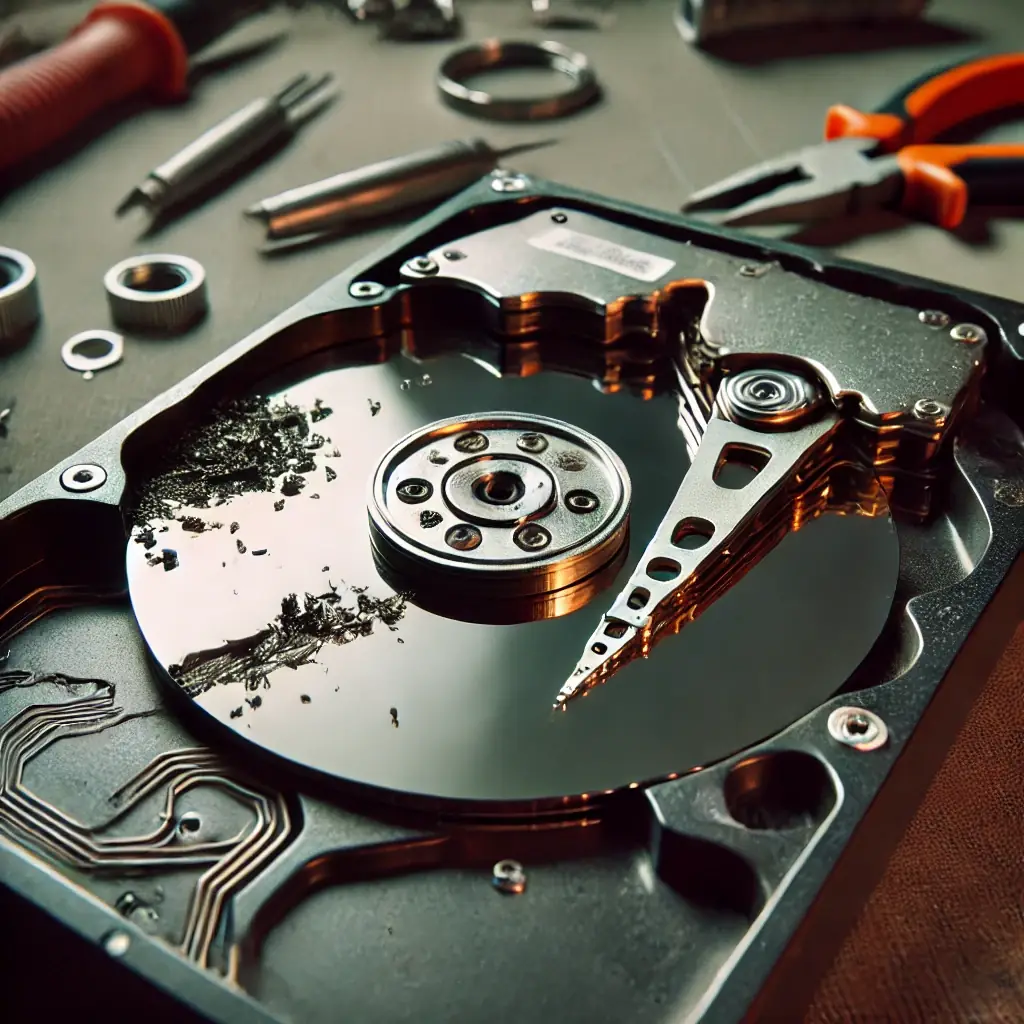
Read/write heads move above the platter surface at a distance of just nanometres. Any damage can have catastrophic consequences.
Symptoms
- Clicking or scratching sounds when accessing data
- Inability to read certain sectors
- Frequent system „freezes" during reading
Technical details
- A damaged head can cause physical scratching of the platter surface
- Electromagnetic coils in the head can fail — inability to read/write
- In severe damage, the head can „crash" onto the platter surface — extensive data loss (head crash)
Clicking/buzzing sounds mean the damaged head cannot properly access data on the discs.
Platter damage
Platters are metal or glass discs coated with a magnetic layer where data is stored. Their damage is often irreversible.
Symptoms
- Scratching or grinding sounds during operation
- Unreadability of large data blocks
- Sudden loss of capacity
Technical details
- Physical scratching leads to „bad sectors"
- Demagnetisation of parts of the platter = data loss
- Complete platter shattering results in total data loss (extreme fall, fire, crushing)
If the drive starts making any unusual sounds, stop using it. Detailed lab diagnostics identify what is physically recoverable.
Seizure of moving parts (Head Stack Assembly)
The mechanism moving the read-write heads can seize, preventing data access.
Symptoms
- Repetitive clicking when attempting to start the drive
- Drive does not spin up or spins irregularly
- System does not recognise the drive
Technical details
- Seizure due to damage to guide rails
- Failure of the electric motor moving the heads
- Heads „stick" to the platter surface after prolonged inactivity (stiction)
Bearing wear
Bearings in the HDD motor enable smooth platter rotation. They wear out over time.
Symptoms
- Drive „beeps", buzzes, or whines
- Irregular platter rotation
- Slower data access
Technical details
- Worn bearings increase friction — motor overheating
- Unstable platter rotation = read/write problems
- In extremes, complete motor failure and head crash onto platters
HDD electronics problems
Drive controller failure
Clicking or beeping signals problems with the control electronics, which cannot correctly manage the read/write heads. Immediately back up data and seek professional help.
Drive power supply problems
- Hearing clicking, buzzing, or scratching? It could be insufficient motor power.
- Cannot access data? Unstable power supply leads to unreadability even when the drive is detected.
- Drive disconnects spontaneously? Fluctuating voltage = irregular disconnections.
- Computer won’t start? Insufficient power prevents drive recognition.
Technical aspects
- Insufficient voltage — HDD requires stable 5 V or 12 V. Below 4.5 V on the 5 V line, the motor may not spin up, potentially damaging heads.
- Voltage fluctuation — fluctuations cause electronics instability; the controller repeatedly restarts operations.
- Startup current — startup requires up to 2 A. Insufficient current = drive won’t spin up.
- PCB components (fuses, capacitors) — disrupted power distribution, partial or complete malfunction.
Internal HDD software (firmware) problems
Key symptoms
- Drive not recognised by BIOS or OS
- Unusual sounds at startup (clicking, beeping)
- Freezing during access — drive is visible but freezes
- Incorrect capacity (too small or too large)
- Partition loss — all partitions suddenly disappear
Technical aspects
Firmware corruption — stored in the drive’s service area. The drive cannot correctly initialise components.
Translator Table errors — the table mapping physical sectors to logical addresses is corrupted. The drive cannot find data.
S.M.A.R.T. module failure — self-monitoring stops working or reports false errors.
Adaptive parameters for read/write are reset or corrupted — reduced performance, increased error rate.
Power management module fails — drive constantly powers on/off or remains permanently active, overheating.
Driver errors and OS configuration
Errors in disk drivers or OS configuration can cause clicking/buzzing. These sounds often signal that the system is accessing the drive incorrectly or repeatedly loading data. Check for driver updates (chipset and SATA/NVMe controller), BIOS/UEFI settings (AHCI vs IDE mode, SMART reporting, Hot-plug, LPM — Link Power Management), the drive’s own firmware version, and the condition of SATA/NVMe power cables.
S.M.A.R.T. module failure — detail
The S.M.A.R.T. (Self-Monitoring, Analysis and Reporting Technology) module continuously monitors drive health — counting reallocated sectors, pending sectors, uncorrectable errors, temperature, power-on hours. If the module stops working or starts reporting false errors, it can mean:
- Firmware corruption in the service area (system area of the drive)
- Disrupted adaptive read/write parameters
- Errors in the head translation table (Translator Table) — the drive cannot find logical blocks
Consequence: the drive may fail prematurely without warning, or conversely report false errors leading to unnecessary panic. In the lab, we can distinguish which case it is and select a safe reading procedure (PC-3000, DeepSpar — passive, „head map" based imaging).
Problems with adaptive parameters
Modern HDDs continuously calibrate parameters for each head and zone (gain, offset, timing). These parameters automatically adjust with wear. If they are reset to factory values or their storage is corrupted, the drive:
- Has reduced read speed (sometimes from 100 MB/s to 1 MB/s or less)
- Increased error rate during reading and writing
- Risk of platter surface damage due to incorrect head flight geometry
- After prolonged operation, progresses to a head crash
In this state, the drive is extremely risky to power on again — the sooner you submit it to the lab, the more data we can save.
Power management module errors
The software controlling power-saving modes (spin-down after inactivity, LPM states) can fail. Symptoms:
- Drive constantly powers on and off (clicking on every access)
- Or conversely remains permanently active even when idle — overheating, shortened bearing life
- System freezes on first access after a long idle (spin-up wait timeout)
Repair is usually in the firmware service area, in the lab, not via software through Windows.
What to do when a drive starts clicking / grinding
- Disconnect power immediately. Every additional power-on damages the drive.
- Do not tap it. It’s a myth.
- Do not put it in the freezer. Another myth — water condensation = short circuit.
- Do not run any recovery software. With a physical fault, it only causes harm.
- Call a professional lab. +420 775 556 063 — initial HDD diagnostics free; targeted file search paid.
Step-by-step detailed procedure in the article What to do when a drive clicks.
Frequently asked questions about HDD mechanical faults
What steps should I take if my drive starts clicking or grinding?
Immediately disconnect the drive from power and do not use it further. Every additional power-on attempt deepens the mechanical damage — a scratched platter is no longer recoverable. Pack the drive in an anti-static bag or its original packaging, do not interfere with any software, and contact a professional lab. Initial HDD diagnostics are free — we find out what can be recovered and quote standard recovery before any work; you decide after that. In non-standard cases (the drive was opened by another service, overwriting/formatting, complex analysis) diagnostics cost 1 210 Kč including VAT (1 000 Kč excluding VAT) — we tell you in advance. Targeted search for a specific deleted file costs 1 210 Kč including VAT (1 000 Kč excluding VAT) even if unsuccessful.
Why can’t I put the drive in the freezer, when the internet recommends this trick?
This myth has caused more permanent data loss than practically anything else. Moisture condensation forms inside the HDD in the freezer. Water on the platter causes a short circuit and oxidation. If the drive is then powered on, the thin layer of water leads to an immediate head crash and destruction of the magnetic surface. Moreover, modern drives have hermetic filling (helium), where freezing deforms the seals.
Does it make sense to open the HDD at home and look inside?
No. Read-write heads move above the platter at a distance of 5–10 nanometres — for comparison, a human hair has a diameter of 100,000 nm. Any dust particle trapped between the head and platter causes immediate scratching of the magnetic layer. Therefore, HDDs are only opened in a Class 100 clean room (ISO 5) with HEPA filtration. A home environment has a particle concentration thousands of times higher than the permitted limit.
Is there a chance to get data from a drive that fell on the floor?
Yes, but it depends on what state it was in during the fall. A drive that fell while powered off often survives without serious damage — the heads are parked off the platters. A drive that fell while running regularly exhibits a head crash (heads scratched the platter) or seizure of the head stack assembly. Even in the worse cases, we can typically recover 60–95% of data if the platter damage is not critical.
How long does data recovery from a mechanically damaged HDD take?
In standard mode, 2–6 weeks. Time breakdown: first indicative assessment (1–2 days) → donor drive identification and ND ordering → head replacement in a clean room (1 day) → drive imaging using DeepSpar / PC-3000 (often several days to a week, because it reads cautiously and slowly) → file system reconstruction → integrity verification → handover. Express mode (within 48 hours) is possible for simple cases with a +100% surcharge.
How much does data recovery from a mechanically damaged HDD cost?
Mechanical damage falls into Damage level 2 or 3 of our price list: from 6 000 Kč excluding VAT for common head/motor damage, from 9 000 Kč excluding VAT for combined damage (HW + SW, shattered platters, multiple faulty channels). You get the exact price after the initial HDD diagnostics, which are free. No recovery, no fee applies to standard classic-media recovery; paid targeted search for a specific deleted file is an exception.
What is a head crash and why is it so dangerous?
A head crash occurs when the read-write head (flying above the platter on a cushion of air or helium) touches down on the magnetic surface during rotation. The platter spins at 5,400–15,000 rpm, so every millisecond of contact erases the magnetic layer and generates dust particles from ceramics and oxides. These particles destroy all other heads (head bulk) and contaminate the entire drive chamber. A head crash is the reason why a drive that is powered on further loses more and more sectors.
My drive is recognised in BIOS — does that mean it’s not mechanically damaged?
Not necessarily. BIOS detects the drive based on the firmware response, which a drive with a damaged head can still manage. Only when attempting to read a sector do clicking, delays, TIMEOUT errors occur. A typical symptom is: the drive is in BIOS, Windows sees it, but copying files freezes after a while. In these cases, the drive is likely in a pre-failure phase, and every further startup reduces the chances of recovery.
What is the difference between a mechanical and a logical fault?
Logical fault = firmware works, hardware is OK, but data is corrupted software-wise (deleted files, corrupted file system, RAW partition, formatting). Solved via software, cheaper (Damage level 1, from 5 000 Kč), and does not require a clean room.
Mechanical fault = physical damage to drive components (heads, platters, motor, PCB). Solved in a clean room by replacing parts from a donor drive and subsequent imaging. More expensive and time-consuming.
Never try to solve drives with a mechanical fault using recovery software — it further stresses the drive with reading, deepening the damage.
Do you have a mechanically damaged drive? Do not power it on. HDD recovery request · +420 775 556 063