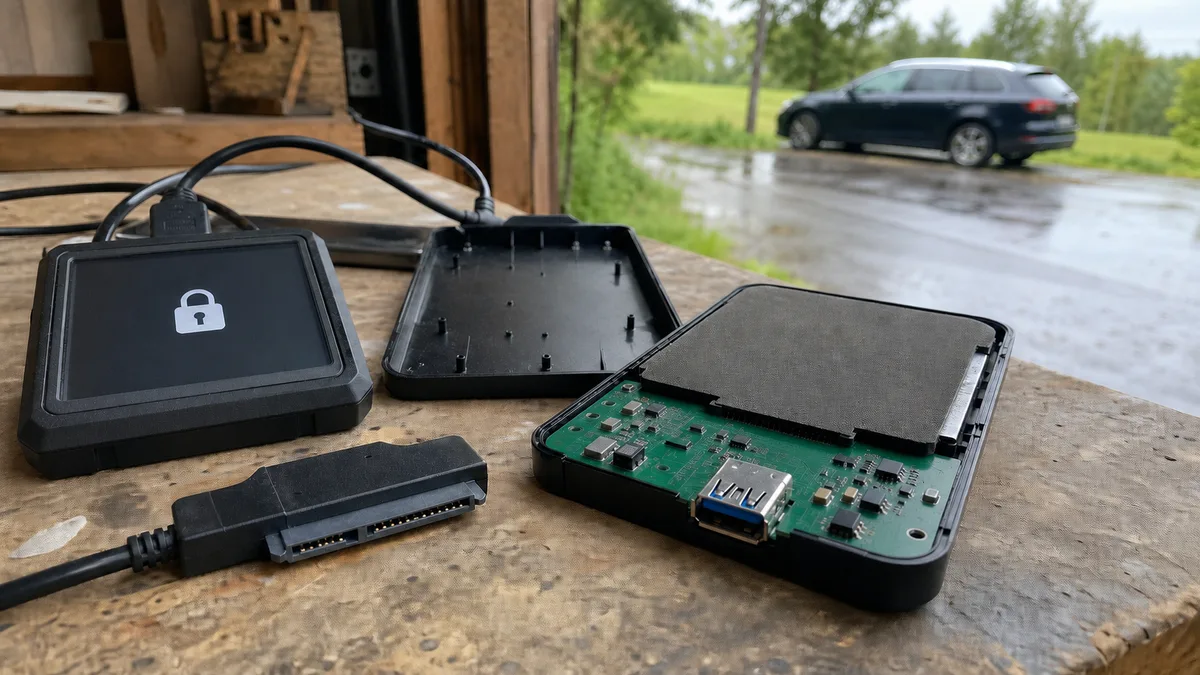
Immediate answer: In a large share of portable WD My Passport drives there is no ordinary SATA disk sitting inside an enclosure — the USB controller is right on the drive’s own electronics, so once you take it apart there is nothing to plug an adapter into. On top of that, Western Digital states in its knowledge base that hardware encryption and a password are two different things and that adding or removing a password neither enables nor disables encryption. A drive pulled out of its original enclosure can therefore stay unreadable even if you never set any password. The first step is not a screwdriver, then, but writing down the full model designation from the label.
Where the advice came from and where it holds
„Take the drive out of the enclosure and connect it over SATA" is the most common answer on forums to an external drive that has stopped working. It did not come out of nothing: many enclosures really do hold an ordinary SATA disk with a small board carrying a USB connector fitted onto it. When that board dies or the connector breaks off, swapping the enclosure really does bring the data back.
The trouble is that the advice is handed out across the board. With portable Western Digital drives it changes the assignment twice: by construction and by encryption. Seagate Expansion, Backup Plus and One Touch have a logic of their own too — and there as well it is the specific model that decides, not the name of the series.
On My Passport there often is no SATA connector at all
The Gillware lab describes it directly in its My Passport analysis: „Most external drives have the USB-to-SATA bridge on a separate small board that’s easy to replace. On many My Passport models, this bridge is integrated directly onto the drive’s main PCB." In other words — the USB bridge is not a separate little board but part of the drive’s main electronics.
The consequence is boringly simple: when you take such a drive apart, you will not find a SATA connector on the board to plug an adapter into. It is not there. Either you put the drive back into its original enclosure, or you end up with a module you can do nothing with at home. The context for other WD series is covered by the text Western Digital HDD repair: when the drive is not detected.
Encryption is not switched on by a password
The second layer is not visible. Western Digital writes literally this in its overview of hardware encryption on external drives: „Hardware Encryption and Password Protection are two different things. Adding or removing a password DOES NOT enable or disable hardware encryption." The same page adds that drives removed from some enclosures may not be readable in other enclosures or in a computer, and that taking a drive out of a single-bay enclosure means losing the warranty.
The My Passport user manual fills this in from the other side: the WD Security software „implements password protection and the 256-bit hardware data encryption capabilities of your supported WD hard drive„ — the password therefore only makes use of a capability the electronics already has. The manual also warns that „not all of Western Digital’s products contain active data encryption" and that in some markets encryption is switched off and the user cannot switch it on. So it cannot be said across the board „it never works„, nor „in your case it will certainly work" — the specific unit decides.
Gillware adds what happens when someone tries: newer models „encrypt data automatically using a hardware key, even when the user hasn’t set a password„ and the key is bound to the original enclosure, so a different enclosure returns encrypted nonsense even at the moment a connection is successfully established. Bridges are not mutually interchangeable, and hunting for „the same unit" on the second-hand market is a dead end.
This is nothing new: users have been dealing with encryption in the electronics of external WD drives since the My Book series and the WD Drive Lock function, as an analysis of one such case documents.
What the manufacturer itself says about encryption by series
| Series according to the Western Digital overview | Hardware encryption |
|---|---|
| My Passport | yes |
| My Passport Pro | no |
| My Book, WD Backup Drive, My Book Duo | yes |
| My Book (WDBACW) with SmartWare enabled | yes |
| WD Elements Portable / Desktop USB 2.0 | yes |
| WD Elements Portable / Desktop USB 3.0 | no |
| easystore Portable / Desktop | no |
The table is based on the WD hardware encryption compatibility matrix. It is kept by series and model prefixes, not by individual units, so it serves for a first sorting — not as confirmation that your drive is or is not encrypted. The WD SmartWare software that part of the table refers to is moreover no longer supported by the manufacturer.
What is worth trying at home and what is not
| Step | At home | Note |
|---|---|---|
| A different USB cable | yes | Gillware names the bundled micro-USB or USB-C cable as a fragile part and a common cause. Replace it before anything else. |
| A different port, directly into the computer | yes | Without a hub, an extension cable and the front panel of the case. |
| A different computer | yes | Distinguishes a problem in the system from a problem in the drive. |
| Disk Management / Disk Utility | just look | Do not initialize the disk, do not create a volume, do not confirm the offer to format. |
| Guessing a forgotten password | no | After the fifth invalid password the manual describes erasing the drive. WD support does not recover a forgotten password. |
| Opening the enclosure, soldering on a SATA connector | no | With an integrated bridge there is nothing to connect to — and the warranty ends. |
| Swapping the electronics from another unit | no | The key is tied to the original electronics; a different board returns unreadable data. |
| CHKDSK, „repair the drive", formatting | no | The GNU ddrescue manual is unambiguous: „Never try to repair a file system on a drive with I/O errors; you will probably lose even more data." |
The last row is taken apart in more detail by CHKDSK on an external drive: when it helps and when it does not.
How you can tell what is actually going on
- Clicking, beeping or repeated spin-up attempts. A mechanical fault. Disconnect the drive and do not power it on again — every further attempt is another read across a damaged surface. The procedure is described by What to do when a drive clicks.
- The drive disappears in the middle of copying. Typically the connector, the cable or the bridge — but a drive that is losing the ability to read shows the same way. One test with a different cable yes, repeated reconnecting no.
- „Disk not initialized", zero capacity, RAW. It may be encryption outside the original enclosure, a damaged partition table, or a physical fault. Without knowing the model and the bridge there is no telling them apart — so in this state confirm nothing.
- A blinking indicator. According to the My Passport manual, fast blinking roughly three times a second means activity, a steady light means idle, and slow blinking every 2.5 seconds means standby mode. Blinking on its own is not a diagnosis.
- The drive was dropped. Among its handling rules the WD manual lists „do not drop or jolt the drive„ and „do not move the drive during activity". After a fall, better not to power the drive on at all.
A general signpost for when a drive does not show up at all: External drive is not loading or not detected.
What the solution looks like in a lab
The procedure differs according to where the fault lies, but the framework is the same: diagnostics without a single write to the original, a sector copy onto another medium, and only over that copy any work with the file system.
With encrypted My Passports one extra step is added: the data has to be brought out through the original encryption key. In practice that means either repairing the drive’s original electronics, or transferring the key so that reading proceeds with the right context — as the Gillware and Exalab labs describe. That is why the original enclosure is part of the job, not packaging to be thrown away.
What to do before you hand the drive over somewhere
Copy down the full model designation and the serial number from the label, note what happened (a fall, a loss of power, just „it stopped showing up„) and what you have already tried — including what did not work. Pack the original enclosure and the cable with it and write down what really matters: accounting, projects, specific folders. And in the meantime do not power the drive on „just once more, to see whether it catches".
If you are not sure whether your unit is encrypted and whether it has a separate bridge inside, send us the model and a description of the state — the difference between a faulty cable and damaged mechanics can be estimated before the drive is driven anywhere. We handle diagnostics and recovery as part of data recovery; whether to bring the drive in person is taken apart by Data recovery in Brno.
Frequently asked questions
Can a WD My Passport be taken out of its enclosure and connected over SATA?
On a portion of the models technically no: the USB controller is right on the drive’s electronics and there is no SATA connector there. And even where it would work, the contents may be encrypted with a key tied to the original electronics. That is why the first thing needed is to know the specific model, not to hunt for an adapter.
Is my My Passport encrypted if I never set a password?
It may be. Western Digital states that hardware encryption and a password are two different things and that adding or removing a password neither enables nor disables encryption. At the same time, not all WD products have active encryption — without verifying the specific unit it cannot be claimed in either direction.
Will buying the same model and swapping the electronics help?
Not with encrypted units. The key is bound to the original electronics, so a different board returns unreadable data even at the moment the drive spins up normally and the system sees it.
What to do when Windows offers to format the drive?
Refuse, do not initialize the disk and do not run CHKDSK or „drive repair". The offer to format means the system has not recognized the structure of the volume — not that the data is gone.
I forgot my WD Security password, can it be recovered?
Western Digital support states that it does not recover a forgotten password and that the drive needs to be erased before further use. Guessing is risky on top of that: after the fifth invalid attempt the manual describes the drive erase function.
Where to find us
ITHOPE is a company based in Brno, Czechia: we do data recovery from disks, RAID and NAS, PC and laptop service and IT for business, all in our own lab at Viniční 3587/216, 615 00 Brno.
Phone +420 775 556 063 (24/7 line). You can bring the device in person, or send it by courier (Zásilkovna, PPL).