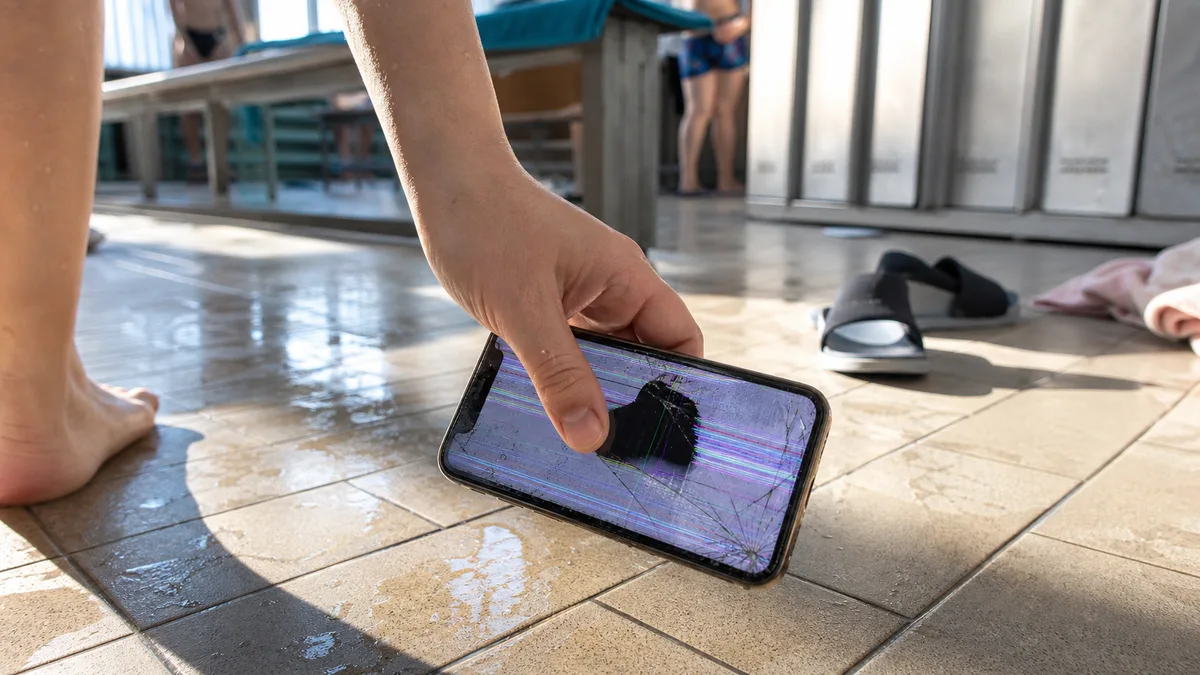
Your phone falls onto a tiled floor, leaving the front looking like a spider’s web. The first question repair shops hear is almost always the same: „Can you replace just the glass?" The answer determines the price, what will work after the repair, and what the phone will tell its next owner.
Quick answer
On the iPhone 12 through 16 and the SE, a cracked front is usually repaired by replacing the entire display module, not just the cover glass. The glass, touch layer, and display panel are bonded together into a single calibrated component. They can only be separated in a specialist workshop and only if the panel underneath the glass is undamaged. Once coloured blotches or lines appear, or parts of the touchscreen stop responding, a „glass replacement" will not solve the problem. Whether the repair is worthwhile depends on the phone’s age and remaining value, not on the wording used in the quote.
What an iPhone „display" actually is
Apple’s service system does not treat the „cover glass" as a separate part. It handles the display as a complete unit, and genuine parts are calibrated individually. According to Apple, calibration data is uploaded and stored on its servers when the part is manufactured and retrieved during the repair. The display is therefore not treated as a simple piece of glass but as a component with its own calibration record.
In practice, it is a bonded assembly consisting of the cover glass, touch layer, display panel, and polariser, along with flex cables, the ambient light sensor, and the front camera assembly, which is transferred to the new module during replacement. When someone says, „Only the glass is cracked," they are describing what they can see—but that is only one of several layers.
Why a „glass replacement" often means something else
Repair shops use this phrase in two different ways, so it is worth confirming in advance exactly what is being offered.
First meaning: an informal name for replacing the module. The repair shop replaces the entire display but calls it the „glass" because that is how the customer described it. There is nothing wrong with this; it is simply shorthand.
Second meaning: refurbishing the display. The glass is separated from the panel in a workshop, replaced, and then bonded again. This is a genuine repair option and makes sense when the panel is undamaged. However, it comes with two conditions that adverts rarely mention: the panel beneath the glass must be intact, and once the module enters the process, there is no going back if hidden damage is discovered. This is precisely why the price of a „glass replacement„ cannot be compared with the price of a „display replacement" until you know what is happening beneath the glass.
How to identify the damage you actually have
Before taking the phone anywhere, examine the screen carefully in daylight:
| What you see | What it probably means | What to do |
|---|---|---|
| A web of cracks, but the image and touch controls work perfectly | the cover glass is damaged, but the panel may be intact | refurbishment may be possible; otherwise replace the module |
| Coloured blotches, lines, or a black or white area | the display matrix is damaged | replace the entire module; changing the glass alone will not help |
| Parts of the touchscreen do not respond or register „ghost" touches | the touch layer or flex cable is damaged | replace the module; a poor-quality replacement part can cause the same symptoms |
| Cracks and the phone will not turn on or charge | there may be another fault in addition to the display | diagnose the phone first rather than ordering a display immediately |
| The rear glass is cracked, not the display | a different repair requiring a different procedure | unrelated to the display |
The last row is not redundant. Rear glass is mistaken for the display more often than you might expect, especially on models whose entire back is also made of glass.
Which models this applies to—and how to identify yours
You can find the model number under Settings → General → About, next to Model Number. This is not the marketing name but a letter A followed by four digits, and it is the number used to order the correct part. Units sold in the Czech Republic belong to the group Apple labels „other countries and regions" in its model identification guide. A phone imported from the United States, Canada, or Japan will have a different number. Detailed instructions are available in how to identify the exact Apple device model before requesting a quote.
| Model (year introduced) | Model number for the Czech Republic | Display according to Apple | Display shown in Parts History |
|---|---|---|---|
| iPhone 12 (2020) | A2403 | 6.1″ Super Retina XDR | yes |
| iPhone 12 mini (2020) | A2399 | 5.4″ Super Retina XDR | yes |
| iPhone 13 (2021) | A2633 | 6.1″ Super Retina XDR | yes |
| iPhone 13 mini (2021) | A2628 | 5.4″ Super Retina XDR | yes |
| iPhone 14 (2022) | A2882 | 6.1″ Super Retina XDR | yes |
| iPhone 15 (2023) | A3090 | 6.1″ Super Retina XDR | yes |
| iPhone 16 (2024) | A3287 | 6.1″ Super Retina XDR | yes |
| iPhone SE (2nd generation, 2020) | A2296 | 4.7″, Home button with Touch ID | no |
| iPhone SE (3rd generation, 2022) | A2783 | 4.7″, Home button with Touch ID | no |
The final column is the important one. Apple states that display information can be shown in Parts and Service History on the iPhone 11 and later, except for the 2nd- and 3rd-generation iPhone SE. After a repair, neither SE model will therefore tell you what type of display it contains. The service receipt remains the only record of the part’s origin. On the iPhone 12 through 16, the phone itself provides this information.
The years in the table indicate when each series was introduced, not when you purchased your particular phone.
What you may lose when the part is not genuine or configuration is incomplete
Apple describes specific issues that can occur with non-genuine displays, and you should know about them before choosing an offer based on price:
- Multi-Touch may not respond on parts of the screen or may register taps in the wrong places.
- Unwanted touches may be registered during calls, and the display may fail to turn off.
- True Tone may not work correctly.
- The ambient light sensor may stop working or perform poorly, causing the screen to dim and brighten unpredictably.
- Colour calibration may be inaccurate, giving the display a yellow or blue tint.
- Brightness may be uneven, and maximum brightness may be lower.
- The battery may drain unexpectedly.
The last point often comes as a surprise: a phone that suddenly no longer lasts a full day after a display replacement may not have a faulty battery. We examine the everyday differences between a new genuine part, a used genuine part, and a copy in iPhone display replacement: genuine part or copy.
There is also the situation where the part is genuine but the repair has not been completed. Until calibration is performed on a supported model, the part appears under Finish Repair on the phone. According to Apple, Face ID and Touch ID cannot be used to unlock the device or sign in to apps until calibration has been completed. Customers typically describe this as „Face ID stopped working after the repair," even though a genuine panel is installed.
We explain what each Parts History status means, and why an „Unknown Part" message is not necessarily proof of a counterfeit, in why your iPhone says „Unknown Part" after a repair. For now, you only need to know where to look: Settings → General → About → Parts and Service History (available from iOS 15.2)—and check it at the counter, not a week later at home.
Face ID: what is and is not related to the display
Face ID is not located in the panel but in the TrueDepth camera assembly, which is transferred to the new display. The connection is therefore indirect but potentially troublesome: if this assembly is damaged during removal, Face ID will stop working, along with Animoji, Memoji, and some front camera features.
Apple has a specific message for this situation: „A problem was detected with the TrueDepth Camera. Face ID has been disabled." Apple also explains why this happens: the TrueDepth camera contains lasers that may be disabled for safety reasons if the device is damaged or malfunctioning. You can continue using the phone, but without biometric authentication. The first step is to update iOS. If you still cannot register your face afterwards, the phone needs professional service.
This is the main reason a DIY attempt is not worthwhile when the display is cracked. With patience, broken glass can be removed. Transferring an undamaged TrueDepth assembly is another matter, and damage to it cannot simply be undone.
The deciding factors: the phone’s age and value
The question is not „repair or do not repair." It is: how much useful life does the phone have left, and what needs to work after the repair?
- iPhone 15 and 16 (2023–2024). These are relatively new phones, so repair almost always makes sense. First, however, check whether the damage may be covered. The available routes are often confused, and coverage cannot be claimed retrospectively. The differences are explained in the Czech article warranty, AppleCare, or out-of-warranty Apple service in Brno. AppleCare+ is not officially sold in the Czech Republic, so an existing plan will generally come from a purchase made in another country.
- iPhone 13 and 14 (2021–2022). This is the typical case where display replacement is worthwhile. The phone still has years of useful life ahead of it, and this is a single fault rather than one problem in a device that is falling apart.
- iPhone 12 and 12 mini (2020). The condition of the rest of the phone is decisive. If the cracked display comes with a worn battery and full storage, those are not three small repairs—they amount to one new phone.
- iPhone SE (2nd and 3rd generation). A smaller display and Touch ID instead of Face ID simplify one aspect but complicate another: biometric authentication does not depend on the display, but the phone will not tell you which part was installed after the repair. This makes the information on the service receipt even more important.
There are two more factors to consider alongside age. First, whether you intend to sell the phone: a buyer will see its Parts History and deduct an unexplained unknown part from the price. Second, whether True Tone and automatic brightness matter to you at all. Some people do not care; others notice the difference on the first evening.
Before handing the phone over for repair
Cracked glass is not merely cosmetic. Dust and moisture can enter through the cracks, and according to Apple, resistance to water and dust is not permanent and may decrease with normal wear. A damaged front certainly does not improve it. Liquid damage is also not covered by the warranty.
At a minimum, do the following before handing over the phone:
- Back it up to iCloud or a computer. This is the only protection you have for your data. We do not recover data from mobile phones, and nobody can guarantee the contents of a broken device.
- Photograph the condition of the phone and make a note of how the accident happened.
- Record the model number and note what you expect to work after the repair (touch response across the entire screen, True Tone, automatic brightness, and biometric authentication).
- Ask whether the replacement will be a new genuine part, a used genuine part, or a non-genuine part, and what will appear in Parts History afterwards.
- Ask for the receipt to state exactly what was replaced—not simply „phone repair."
As part of a pilot service, we accept out-of-warranty hardware repairs for the iPhone 12 and later. We confirm the scope of work for each device from its model number after diagnosis, and we neither are nor claim to be an Apple Authorised Service Provider. We discuss typical repair times in how long it takes to repair an iPhone, MacBook, or iPad, and how to choose a repair shop in Brno in where to have an iPhone repaired in Brno. To arrange a specific appointment and an assessment of your case, use our contact page or call 774 777 774—all we need is the model number and a photo of the screen.
Frequently asked questions
Can you replace just the glass on my iPhone 13?
The honest answer is that it depends on what is underneath. If the panel is undamaged, refurbishment in a specialist workshop may be possible. Once lines or blotches appear in the image or the touchscreen starts missing inputs, the entire display module must be replaced. An inspection—not the price in an advert—will determine the answer.
My iPhone SE (3rd generation) display is cracked—will I be able to tell which part was installed after the repair?
Not from the phone itself. Apple does not show the display in Parts History on the 2nd- or 3rd-generation iPhone SE, so the service paperwork is the only evidence of the part’s origin. On the iPhone 12 through 16, the phone itself provides this information.
Will Face ID still work after the display is replaced?
Yes, if the repair is performed correctly. Face ID is housed in the TrueDepth assembly, which is transferred to the new module. If it is damaged, the phone will report that a problem was detected with the TrueDepth camera and that Face ID has been disabled. When a genuine part has been installed but calibration is incomplete, neither Face ID nor Touch ID will work for unlocking until the repair is completed.
Will I lose True Tone after replacing the display?
Apple states that True Tone may not work correctly with a non-genuine panel. Problems may also affect the ambient light sensor, colour calibration, and brightness. It continues to work with a genuine part once configuration has been completed.
Can I wait for a while with a cracked display?
If the phone still displays normally and responds to touch, it is not an emergency. Bear in mind, however, that dust and moisture can enter through the cracks and that water resistance is not permanent. Every additional week increases the risk of a second fault developing alongside the damaged display.
Can you recover photos from my broken iPhone?
No. We do not recover data from mobile phones or offer it as an add-on to repairs. The only reliable way to protect your data is an iCloud or computer backup made before anything goes wrong.
Sources
- Apple: About genuine iPhone displays
- Apple: iPhone Parts and Service History
- Apple: If an alert says Face ID has been disabled
- Apple: Identify your iPhone model
- Apple: About splash, water, and dust resistance of iPhone 7 and later
Where to find us
ITHOPE is a company based in Brno, Czechia: we do data recovery from disks, RAID and NAS, PC and laptop service and IT for business, all in our own lab at Viniční 3587/216, 615 00 Brno.
Phone +420 775 556 063 (24/7 line). You can bring the device in person, or send it by courier (Zásilkovna, PPL).