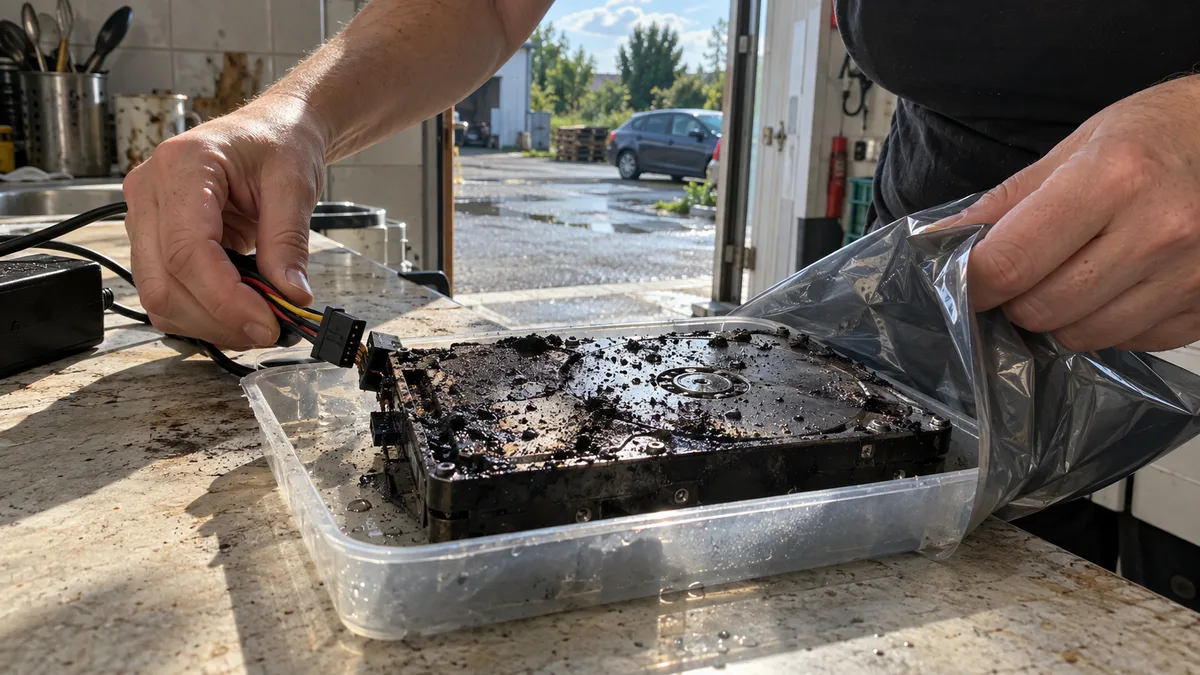
The short answer: Do not power on, open, or clean a burned, wet, or deformed HDD. The data may remain readable if the fire did not destroy the recording layer on the platters, but the drive’s actual condition can only be determined by inspecting its mechanical components and, if necessary, examining it in a cleanroom. „Repairing a hard drive after a fire" means recovering the data once onto another storage device—not returning the damaged drive to service.
A drive may look beyond repair from the outside while its platters remain intact. Likewise, a clean enclosure does not mean that the heads, motor, or electronics are undamaged.
The color of the enclosure or a melted plastic frame does not determine the outcome. What matters is whether soot or extinguishing agents entered the drive, how much heat its mechanical components were exposed to, and whether anyone powered it on after the fire.
What to expect based on the damage
Without diagnostics, no one can promise a complete or even partial recovery. The drive’s external condition can, however, indicate what problems a technician may encounter:
| Finding | What the fire may have damaged | What it means for the data |
|---|---|---|
| Burned cable or connector, rigid enclosure with no deformation | power supply, interface, or circuit board | the platters may remain readable, but the drive must not be tested with a different power supply |
| Soot on the enclosure and electronics | contacts, components, and—if it entered the drive—the heads and platters | internal contamination must be ruled out before the drive is spun up |
| Water or extinguishing agent inside the device | electronics, mechanical parts, and platter surfaces | corrosion progresses over time; the drive should be handed to a specialist promptly |
| Deformed HDD enclosure | motor spindle, platter mounting, heads, or essential mechanical clearances | attempting to start the drive may cause the heads to contact the platters |
| Visibly damaged platters or recording layer | the physical surface where the data is stored | recovery may be partial or technically impossible |
The critical distinction is between damage to components that can be bypassed or replaced during reading and damage to the recording surface itself. Under certain conditions, problems with the electronics or read/write heads can be addressed. Data from a physically destroyed section of a platter cannot be recreated.
Do not power on the drive or the device
After a fire, do not test whether the drive still spins. Do not connect it through a USB adapter, install it in another computer, or power on the NAS or surveillance recorder „just to check."
A spinning motor is not proof that it is safe to continue. If particles have entered the space between a head and platter, or if the mechanism is deformed, the heads may damage the recording surface during the very first attempt.
Until a technician takes possession of the drive:
- do not power on the drive or the device it was installed in;
- do not open the HDD’s metal cover;
- do not wash the enclosure, electronics, or connectors;
- do not dry the drive with a hair dryer, on a radiator, or with compressed air;
- do not spray it with contact cleaner;
- do not swap in a circuit board from another drive;
- keep the original frame, USB enclosure, cables, and power adapter;
- make a note of whether the drive has already been powered on since the fire.
Even a circuit board from the same drive model may not work as a direct replacement. An HDD may store adaptive and calibration data on its electronics that is tied to its specific mechanical assembly. An unqualified board swap may therefore fail to start the drive and can introduce another fault.
If you do not want to risk that first power-on attempt, bring the drive to Brno for diagnostics. We will assess its condition first and recommend the next steps based on what we find.
Heat, soot, and firefighting water act together
A fire is not simply a more severe power surge. A single HDD may be exposed to heat, smoke, water, and extinguishing-agent residue at the same time.
Heat
Heat can damage circuit-board components, connectors, the motor, read/write heads, and the drive’s mechanical geometry. If the enclosure or platters have become deformed, the original mechanical clearances may no longer be maintained.
Replacing the electronics alone therefore does not resolve mechanical damage. A drive that failed after an electrical fault without a fire requires a different approach, described in our article on a hard drive damaged by a power surge or storm.
Soot
Soot is not merely a cosmetic layer on the enclosure. It may be electrically conductive, chemically aggressive, and contain solid particles. If it has entered a damaged drive mechanism, the disk must not be spun up before it has been assessed.
Do not unscrew the HDD’s metal cover at home. Opening it in an ordinary room introduces additional contaminants and makes it harder to distinguish fire damage from the effects of subsequent handling.
Water and extinguishing agents
Water, foam, or dry chemical extinguishing agents can damage electronics and accelerate corrosion of contacts and mechanical components. Do not rinse the drive or attempt to dry it with heat at home. Contact the laboratory as soon as possible for packing and transport instructions based on what the storage device was exposed to.
If the device was submerged without suffering heat damage, follow our guide to first aid and data recovery for a submerged device.
First aid by device type
The basic rule is the same for an internal HDD, external drive, and NAS: do not power it on. The device’s original configuration does, however, matter when you hand it over.
Drive from a computer
Do not force it out of a deformed case. If it is safely accessible, document the connections and label. If removal could cause further mechanical damage, bring in the entire computer.
External HDD
For drives in the WD Elements, WD My Passport, Seagate Expansion, or Seagate Backup Plus families, keep the original USB enclosure, cable, and power adapter. The enclosure may contain an interface bridge, and in some designs the USB electronics are part of the drive itself.
A fire can easily destroy the plastic casing, but removing it at home may not reveal a standard SATA interface. The original electronics are also important for accurately identifying the storage device.
Synology, QNAP, or surveillance recorder
Do not power on the device or run a check, volume repair, or rebuild. Photograph:
- the front of the device;
- the drive-bay order;
- the label of each position;
- the drive labels;
- the cabling and any connected expansion units.
Do not mix up the drives. With RAID, recovering each HDD separately is not enough; reconstructing the array requires the original drive order and configuration. If you are unsure how to remove the drives, bring in the entire NAS. A detailed list of the information to prepare is available in our article sending a business NAS to the laboratory: what to prepare.
SSD from a laptop or server
An SSD has no platters or read/write heads, so it is not assessed in the same way as an HDD. Fire may damage the controller, power circuitry, or memory chips. Do not power on the SSD or desolder any components; submit the complete module or device for diagnostics.
How a fire-damaged HDD is diagnosed
A safe procedure does not begin by connecting the power. The first step is to determine whether spinning up the drive could cause further damage.
- Documenting the storage device. The model, serial number, original device, visible damage, and any previous attempts to power on or clean it are recorded.
- Inspecting the enclosure and electronics. The technician looks for deformation, heat damage, corrosion, deposits, and damaged connectors.
- Assessing the mechanical components. If the condition requires it, the HDD is opened in a controlled clean environment so the platters, heads, and internal contamination can be inspected.
- Selecting components and procedures. Depending on the findings, the electronics, read/write heads, or mechanical components may need attention. A compatible donor drive is used to recover data, not to repair the original HDD for continued use.
- Controlled reading. The source drive is read onto another storage device. The objective is to obtain the best possible bit-for-bit image while minimizing intervention on the original.
- Recovery from the image. Partitions, the file system, and individual files are evaluated only after the image has been acquired.
A bit-for-bit image does not in itself guarantee that every sector was readable. The result may therefore be a complete recovery, partial recovery, or only a selection of undamaged files.
When professional recovery is worthwhile
A wet or burned drive—or one with a damaged enclosure—is still worth submitting for diagnostics. Photographs and an external inspection alone are not enough to predict the result.
Base your decision on the value of the data and whether a verified copy exists:
| Situation | Reasonable next step |
|---|---|
| A current backup exists and a test restore works | restore the data from the backup and do not use the damaged drive |
| A backup exists, but no one has attempted to restore its data | verify its contents first without touching the damaged drive |
| The HDD contains the only copy of accounting records, project documentation, or customer data | do not attempt to start it; submit the drive for diagnostics |
| The device is a RAID array or multi-drive NAS | preserve the drive order and provide information about the array |
| Someone has already powered on, opened, or cleaned the drive | stop further attempts and describe exactly what was done |
| The platters or their recording layer are physically destroyed | expect partial recovery or the possibility that the data cannot be recovered |
Do not conceal an unsuccessful attempt. Information about powering on the drive, replacing its electronics, or opening the enclosure can fundamentally change the safe working procedure.
What to prepare before handing it over
The technician needs a description of the incident, not your estimate of the fault. Prepare the following information:
- when the fire occurred;
- whether the drive was installed in a laptop, desktop computer, external enclosure, NAS, or recorder;
- whether the device was running during the fire;
- whether it was directly exposed to flames, smoke, water, or another extinguishing agent;
- what was used to extinguish the fire;
- whether anyone powered on the device after the fire;
- whether the drive was opened, cleaned, or dried;
- the model and serial number, if they can be read safely;
- which data has the highest priority;
- whether a backup exists and whether a test restore has already been performed.
For business data, also provide the owner of the storage device and the person authorized to approve the work. Sensitive storage devices should be transferred under a documented handover protocol.
Documentation for businesses and insurers
If permitted by the fire brigade or investigators, photograph the device while it is still at the scene. Capture its surroundings, original location, asset label, serial number, and visible damage.
For your internal records, retain:
- the date and a brief account of the incident;
- the incident number or fire brigade report, if available;
- the extinguishing method;
- the approximate duration of exposure to water, smoke, or extinguishing agents;
- a list of people who handled the storage device;
- photographs taken before removal;
- the handover record;
- the diagnostic result and approved scope of work;
- documentation of the costs.
Insurers’ requirements vary. Before disposing of the device or ordering paid recovery work, check which supporting documents your specific insurer requires.
How to identify a suitable provider
Before handing over the drive, ask about the actual procedure. The provider should be able to explain:
- whether the storage device will first be inspected without being powered on;
- when an HDD is opened and in what environment;
- whether the source drive is read into an image;
- how further stress on the original is minimized;
- when donor parts are used;
- what written information you will receive after diagnostics;
- how the recovered data will be delivered;
- who will have access to it;
- whether you may decline further work after diagnostics.
Warning signs include a firm promise of complete recovery without diagnostics, spinning up a contaminated HDD at the front desk, or claiming that replacing the electronics at home will be enough. An honest diagnostic result may also conclude that any further attempt would only make the condition of the data worse.
Frequently asked questions
Can I power on the drive once to see whether it works?
No. If particles have entered the drive or its mechanism has become deformed, spinning it up may damage the recording surface. Hearing the motor or seeing the drive report its model does not mean that reading the data is safe.
Should I dry a wet drive before transporting it?
Do not heat, blow out, or rinse it. Tell the laboratory as soon as possible whether it was exposed to water, foam, or another extinguishing agent, and request packing instructions.
Is it worth bringing in an HDD with a burned enclosure?
Yes, for diagnostics. The external enclosure does not reveal the condition of the platters. The outcome cannot be predicted from a photograph or from whether the drive still spins.
What should I do with drives from a fire-damaged Synology or QNAP?
Do not power on the NAS or start a rebuild. Photograph the drive-bay order and drive labels. If you cannot remove the drives without damaging them while preserving their order, bring in the entire device.
Can the repaired drive be used again?
No. The purpose of the work is to recover the data onto another healthy storage device. A drive exposed to fire, water, or soot should not be returned to normal service.
Can the price be determined from a photograph?
A photograph can help with an initial assessment, but it does not reveal the condition of the heads or recording surfaces. The scope of work and required parts can only be determined after diagnosing the specific medium.
Where to find us
ITHOPE is a company based in Brno, Czechia: we do data recovery from disks, RAID and NAS, PC and laptop service and IT for business, all in our own lab at Viniční 3587/216, 615 00 Brno.
Phone +420 775 556 063 (24/7 line). You can bring the device in person, or send it by courier (Zásilkovna, PPL).