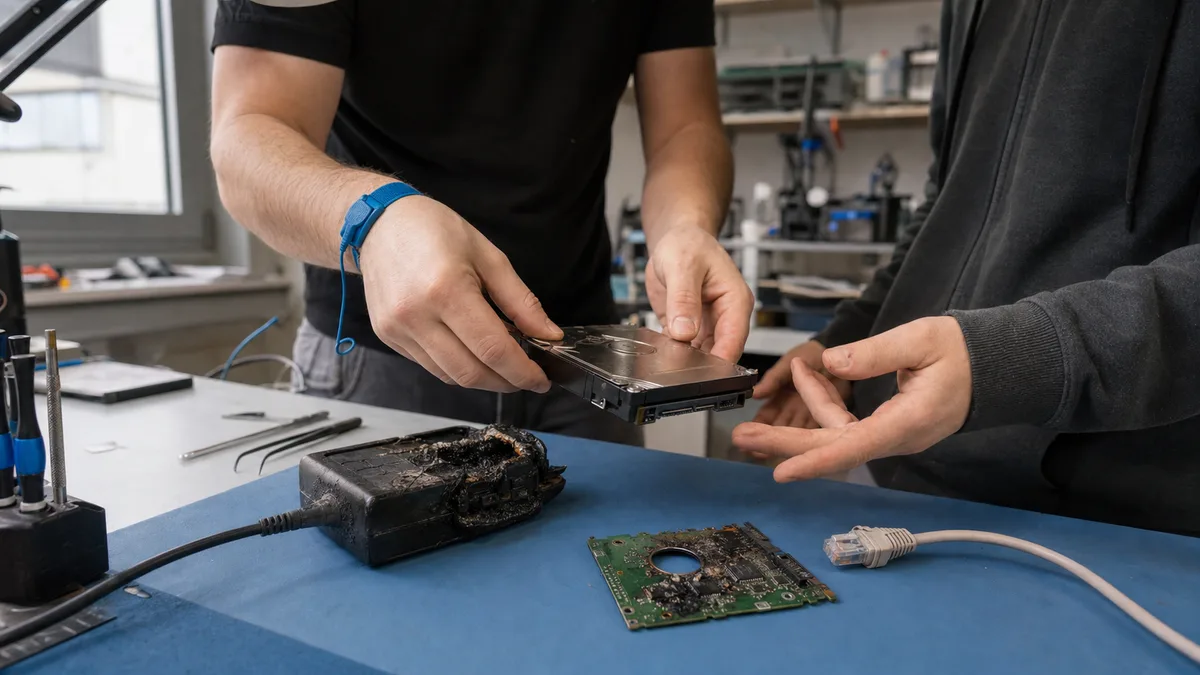
The short answer: If your drive, computer, or NAS will not start after a storm, smells burnt, or is no longer detected by the system, disconnect it from the power supply and stop trying to revive it. A power surge often burns out a drive’s electronics, while the magnetic data stored on the platters usually survives. What can destroy your data are the attempts that follow: fitting a circuit board from another drive, repeatedly powering the drive on, or connecting it to a damaged power supply. Replacing the board with an apparently „identical" one does not work because modern drives store adaptive data unique to each unit in ROM. Have the drive diagnosed before a neighbour or the first available repair shop tries anything. A burnt drive is not repaired for continued use; its data is recovered. Our process is described on the drive repair after a power surge and data recovery page.
Summer storms are the most common reason we see drives with burnt electronics. The sequence is usually the same: a storm passes overnight, and in the morning the computer will not turn on, the NAS shows no lights, or an external drive appears dead. A surge can reach equipment through the mains supply, but in the case of NAS devices and routers it can also travel through an Ethernet cable or antenna lead. This article explains exactly what can burn out inside a drive, why the popular advice to „buy the same drive and swap the electronics" is more likely to finish off your data, and what the safe route to recovery looks like.
What a power surge actually damages inside a drive
A voltage spike travels from the wall socket through the computer’s power supply or an adapter to the drive’s power rails. Its first line of defence is a set of protective TVS diodes at the power input. These are designed to act like fuses: during a surge, they fail short and sacrifice themselves to prevent the spike from travelling farther. When this works as intended, the drive appears dead because the shorted rail prevents it from starting, but the rest of the electronics may still be intact.
A stronger surge or repeated spikes can travel farther. The motor driver, controller, or circuitry around the ROM chip on the printed circuit board may then be damaged. In the worst case, the surge reaches the sealed drive chamber and burns out the preamplifier on the read-head assembly. This component sits next to the heads inside the drive, and repairing such damage requires mechanical work in a clean environment, not merely a circuit-board repair.
The important good news is that data is stored magnetically on the platters, so an electrical spike does not normally damage it directly. After a surge, the problem is therefore usually not destroyed data but a destroyed electronic path to it. That is precisely why losing the data through a careless repair attempt would be such a waste.
The first few minutes after a storm
- Disconnect the affected device from its power supply. For a NAS or router, unplug the Ethernet cables as well—the surge may have arrived through the network.
- Do not keep trying to turn it on. Partially damaged electronics can deteriorate with every start and destroy components that initially survived.
- Do not connect the drive to a computer or power supply hit by the same surge. A damaged power supply can feed the wrong voltage to the drive and finish off a unit that survived the storm.
- Document the incident for your insurer. Record the date and time of the storm and take photographs of the equipment; keep any receipts as well. A diagnostic report can support your insurance claim.
- List the data that matters most. Accounts, projects, family photographs—the technician can then verify the most important files first.
The HDD data recovery process by fault type explains in detail how to proceed based on specific symptoms, such as a drive that will not spin, clicks, or reports the wrong capacity. With a surge-damaged drive, however, the decision is simpler than with many other faults.
When not to try it yourself and what we will do
After a storm, a DIY attempt is particularly dangerous when:
- the drive is not detected or does not spin at all—repeatedly powering it on will not repair a shorted protection diode or burnt circuit board; it will only allow the damage to spread,
- the drive or power supply smells burnt or dark marks are visible on the circuit board—do not attempt another start,
- the drive has started clicking or makes a different sound than before—the surge may have reached the heads, making this a mechanical fault.
If the drive contains the only copy of important data, switch it off and bring or send it to us for hard drive data recovery. For external drives, see external drive repair and data recovery. The process has three steps:
- Intake—bring the drive to our laboratory in Brno-Židenice or send it to us; for an external drive, include its enclosure and adapter. We will record when the storm occurred and what you have already tried.
- Diagnostics—we measure the electronics and determine exactly what has burnt out and what can be recovered. Initial diagnostics for a standard HDD or SSD may be free. For non-standard cases, such as a drive opened by another repair shop or one requiring complex analysis, diagnostics cost 1 210 Kč including VAT (1 000 Kč excluding VAT), and we will tell you in advance. A simple initial assessment of a NAS or RAID may also be free; we will quote the price of a more complex analysis before starting the work.
- Quotation, then recovery—you receive a recovery quote before the work begins, and we do nothing further to the drive without your approval. Indicative prices by fault type are listed in our data recovery price list.
Is it urgent? Call our 24/7 helpline on +420 775 556 063.
Why buying the same drive and swapping the circuit board is not enough
The most common online advice for a burnt drive is to find the same model, unscrew the circuit board, fit the replacement, and carry on. Fifteen years ago, this occasionally worked. With modern drives, it is a trap for two reasons.
Adaptive data in ROM. Every drive undergoes individual calibration during manufacturing, covering read-head parameters, compensation for manufacturing tolerances, defective-area maps, and servo parameters. These „adaptives" are stored in ROM on the circuit board and are unique to that particular unit. Even two drives of the same model from the same box will have different ROM contents. A replacement board with the wrong adaptive data may prevent the drive from starting altogether, or the drive may identify itself but return meaningless data. Repeated starts with incorrect calibration also place needless strain on the heads above the platters.
The same model number does not mean identical hardware. Manufacturers change circuit-board and firmware revisions during production without changing the model name. Even an „identical" drive bought six months later may contain incompatible electronics.
The correct procedure is therefore different: the ROM from the original board is transferred to a compatible donor board, either by resoldering the chip or reading and writing its contents. The shorted TVS diodes and damaged circuits are checked, and only then is the drive safely powered on for the first time with working electronics and its original adaptive data. This requires microsoldering tools and professional service equipment, not a screwdriver at the kitchen table.
When the surge travels beyond the circuit board
If the drive still will not start with repaired electronics and the transferred ROM, the surge has penetrated deeper, typically reaching the head preamplifier or motor. This is no longer a circuit-board repair but a mechanical recovery: the drive must be opened in a clean environment and the head assembly replaced with one from a donor drive.
To give you a rough idea of the cost, our data recovery services start at CZK 2,900, typically for electronic and logical faults, while mechanical work involving the opening of a drive costs up to approximately CZK 18,900. Initial HDD and SSD diagnostics are free, and recovery is provided on a no recovery, no fee basis—if the requested data cannot be recovered, you do not pay for the recovery. Diagnostics for non-standard cases, such as media opened by another repair shop, overwritten or formatted media, or complex analysis, cost 1 210 Kč including VAT (1 000 Kč excluding VAT), and we will tell you this in advance. You will receive an exact quotation after diagnostics, not over the phone. No one can honestly tell from the description „it stopped working after a storm" whether only a protection diode sacrificed itself or the preamplifier failed.
NAS after a storm: the surge can also arrive through the network cable
A NAS is more vulnerable than a computer during a storm because a surge has two possible routes into it: the power supply and Ethernet. A surge induced in network cabling can destroy the NAS network interface even if its power supply is connected through surge protection.
Most commonly, the NAS power supply or adapter fails after a storm while the drives inside remain intact. The worse scenario is that the spike passes through the power supply and hits all the drives at once. RAID cannot handle this: an array is designed for individual drives to fail one at a time, not for several drives to be damaged simultaneously.
Stricter rules therefore apply to a NAS after a storm:
- Do not try the drives in another NAS or buy an „identical enclosure" to test them—the new system may write to the drives and overwrite the array metadata.
- Do not start a rebuild or volume repair if the NAS partially boots and reports a degraded array.
- Do not connect the drives to Windows—the prompt to „initialise the disk" is a trap that can overwrite the partition tables.
- Label the drives by bay if you remove them.
For the complete safe procedure, including an explanation of why Windows cannot understand NAS drives, see how to retrieve data when a NAS dies.
External drives and SSDs after a power surge
In an external 3.5-inch drive, the power adapter stands between the voltage spike and the drive. The adapter often sacrifices itself, though the enclosure electronics may fail instead. The drive inside may then remain untouched. Do not buy a replacement adapter at random, however: voltages and pinouts vary, and the wrong adapter can damage the drive more reliably than the storm itself. Be particularly careful with portable WD drives. In many models, encryption is handled by the USB controller in the enclosure, so removing the drive and connecting it directly will produce only unreadable data. The article on what to do when an external drive will not load or is not detected explains how to proceed.
SSDs often fare worse after a surge than their reputation for durability might suggest. The spike can damage the power circuitry and controller. The NAND chips containing the data often survive, but without a working controller, the only route to the data may be complex direct chip reading—and with some proprietary controllers, there may be no viable route at all. The article on SSD data recovery explains why SSD recovery is a specialised discipline.
How a surge-damaged drive is diagnosed
Diagnosing a burnt drive begins with measurements, not by switching it on. We first inspect the circuit board visually for scorched components and dark marks, then measure the power rails for short circuits and check the TVS diodes and fuses. The drive is powered on only after its electronics are safe—either repaired or replaced with a donor board carrying the transferred ROM. This first start takes place on professional service equipment that can control the reading process and stop it immediately if problems arise.
The goal is not to return the drive to everyday use but to create a sector-by-sector copy and recover the data from that copy onto healthy media. Do not put a surge-damaged drive back into service, even if it appears healthy after its electronics have been repaired. It has undergone electrical stress that may cause problems later.
Prevention: surge protection, UPS, and backups
The only completely reliable protection during a storm is physical disconnection—unplugging both the power supply and Ethernet cables. Everything else merely reduces the risk:
- Multi-stage surge protection. Surge protection devices in the electrical distribution board absorb the bulk of the energy, while a surge-protected power strip deals with the remainder. A cheap power strip on its own will not stop a major surge without protection in the distribution board, and it may be exhausted after a single event without any visible sign.
- A UPS for your NAS. An uninterruptible power supply mainly protects against outages, which NAS devices tolerate poorly. Incomplete writes caused by a power failure are a common reason for volume failure. Higher-quality UPS units also filter the power supply. A UPS does not replace surge protection; it complements it.
- Watch out for cables entering from outside. Outdoor Wi-Fi antennas, PoE cameras, and long Ethernet runs provide entry points for induced surges and should have dedicated protective devices.
- Backups following the 3-2-1 rule. A storm is exactly the kind of event that can destroy both a computer and an external backup connected to the same outlet. At least one copy of your data must therefore be disconnected or stored off-site. The article on using an external HDD for backup and the 3-2-1 rule explains how to set this up in practice.
Frequently asked questions
Can data on a drive survive a lightning strike?
Very often, yes. A power surge destroys electronics, but the magnetic data on the platters remains intact. Data is usually lost as a result of what happens next: fitting another drive’s circuit board without transferring the ROM, repeatedly powering the drive on, or connecting it to a damaged power supply.
Can I replace the electronics with a board from the same drive model?
Not without transferring the ROM. The board carries adaptive data unique to that specific unit. With adaptive data from another drive, the disk may not start or may read incorrectly. The correct procedure is to transfer the ROM from the original board to a compatible donor and repair the damaged protection circuits.
The computer works after the storm, but the drive does not—what now?
Disconnect the drive and do not test it again in that computer. The power supply may have been damaged even if the computer boots, and it could finish off the drive by supplying the wrong voltage. Have the drive diagnosed; our initial HDD and SSD diagnostics are free.
Will an inexpensive surge-protected power strip help?
Only to a limited extent. It acts as the final stage after surge protection devices in the distribution board. On its own, it will not absorb a major surge, and it may become ineffective after a single event without showing any outward sign. A NAS also needs protection on its Ethernet connection, which the power strip does not cover.
How much does data recovery after a power surge cost?
It depends on how far the damage has spread. Data recovery starts at CZK 2,900, while mechanical work requiring the drive to be opened costs up to approximately CZK 18,900. Initial diagnostics for a standard HDD or SSD may be free. For non-standard cases, diagnostics cost 1 210 Kč including VAT (1 000 Kč excluding VAT); for RAID and NAS devices, the price of a more complex analysis depends on its scope. We will always inform you in advance. Recovery is provided on a no recovery, no fee basis—if no data is recovered, you do not pay for the recovery.
Where to find us
ITHOPE is a company based in Brno, Czechia: we do data recovery from disks, RAID and NAS, PC and laptop service and IT for business, all in our own lab at Viniční 3587/216, 615 00 Brno.
Phone +420 775 556 063 (24/7 line). You can bring the device in person, or send it by courier (Zásilkovna, PPL).