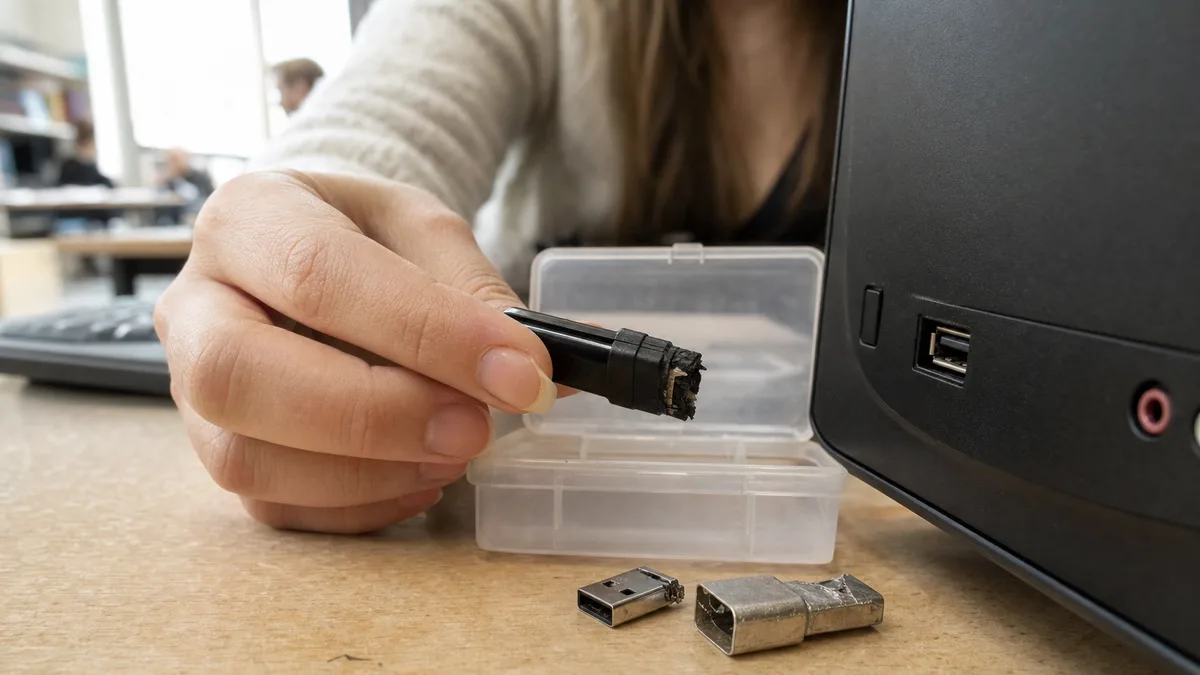
The short answer: The data on a flash drive doesn’t live in the connector, it lives in the NAND memory chip — and that chip usually survives a snapped-off connector without a scratch. What it doesn’t survive is DIY soldering: overheating, torn-off pads or a 5 V short into the data lines can turn a fixable fault into a hopeless one. Stop plugging the drive in, don’t hold it in the port „at the angle where it catches", cancel every prompt to format it, and don’t take it apart. Keep any broken-off pieces and have the drive diagnosed first — only diagnostics will tell you whether it’s the connector, the electronics, or a job for chip-level work.
A flash drive is the cheapest storage you can buy — and yet it surprisingly often ends up holding the only copy of something important: an accounting backup „for the road", a client project, a presentation, exports from an old application. Then you catch the drive sticking out of your laptop and the connector snaps. This text is a decision guide: what to do right away, why a snapped-off connector is usually good news, why DIY soldering is a bad idea, and what recovery looks like once the drive’s controller stops responding.
Dead USB stick: what to do right away
- Unplug the drive and stop trying it in more ports and computers. Two attempts are enough to tell you the problem isn’t one specific USB port.
- Don’t hold it in the port at an angle. If it only „catches" when you press it, the solder joints have cracked — every movement tears them further and risks shorting power into the data lines.
- Cancel every prompt to format or initialise the drive.
- Don’t run CHKDSK or other repair tools — they fix things by writing to the medium.
- Don’t solder, don’t disassemble, and don’t try to bend the connector back into shape.
- Note down what happened: bent in the port, dropped, spilled on, „stopped working on its own", a failure during copying.
- Broken-off pieces — the connector, a piece of the casing — send them along with the drive. They’re worth something for diagnostics.
One rule above all others: if the drive holds the only copy of something important, every further experiment is a gamble with your data, not with the twenty quid a new drive costs.
Broken connector: the most common fault, and usually fixable
A flash drive’s USB-A connector is held to the circuit board by four small soldered pins (5 V power, ground and two data lines) plus a couple of mechanical anchors. The leverage applied by an elbow, a closing door or a laptop bag is enormous by comparison. The result is usually one of three states:
- The connector holds, but the joints have cracked. The drive only works „at an angle" or when pressed. This is the most treacherous variant — it tempts you to hold it there and quickly copy the data off. That’s exactly when the cracked joints touch and separate, and a single 5 V short into a data line can finish off the controller.
- The connector has torn off cleanly. The solder pads are still on the board. For a workshop with a microscope and a micro-soldering iron this is routine; the key is that nobody has touched those pads beforehand.
- The connector took the pads or a piece of trace with it. The pads have peeled off the board, or the vias into the inner layers have cracked. Repair means exposing traces under the solder mask and running new jumper wires — microscope work, not a kitchen-table job.
The good news to close on: the NAND chip itself takes no mechanical damage when the connector breaks. As long as nobody interferes with the case, recovering data from a flash drive with a broken connector is one of the more tractable faults out there.
Why DIY soldering finishes the data off
In a photo online it looks like four little wires. In practice it’s the most common way to turn a solvable case into an unsolvable one:
- Torn-off pads. An amateur attempt with a big tip and brute force rips the pads clean off. Then there’s nothing left to solder to, and improvised scraping of the mask and pulling traces out of the inner layers wrecks the board further.
- Overheating. Both the controller and the NAND sit on a small board a few millimetres from the connector. Prolonged heating with a soldering gun or a hot air station without temperature control heats them too.
- Shorts and swapped wires. Swapping 5 V with a data line, or leaving a solder bridge between pads, means sending voltage where it was never meant to go. The controller or the NAND may not survive it — and once the NAND is dead, so are the lab’s options.
- The economics of the risk. Repairing a torn-off connector is one of the cheaper jobs. After a botched DIY soldering attempt it turns into reading the chip outside the controller — more expensive work with less certainty, if there’s anything left to read at all.
Connector repair is a legitimate technique. It just belongs under a microscope, in the hands of someone who does micro-soldering routinely — and who documents the state of the board beforehand so there’s something to fall back on.
Monolithic flash drive: when there’s nothing to solder
A large share of today’s flash drives — especially the slim, miniature and promotional ones — has no conventional board with a separate controller and NAND chip. The entire electronics are potted in a single black monolith the size of the connector: controller, memory and passive components all in one package.
When a monolith breaks or stops responding, there’s nothing to „re-solder". Recovery goes through the technological (test) pads — tiny contacts on the edge or under the package’s coating that the manufacturer used to bring the chip up in production. Their layout isn’t standardised; it has to be worked out for the specific manufacturer and controller, often by probing. The work itself means grinding away the coating, attaching dozens of thin wires under a microscope and reading the memory directly, bypassing the usual USB interface.
That’s why with monoliths the rule counts double: no DIY interventions. The only route to the data runs through those pads, and scratching or overheating destroys them for good.
The drive reports something odd: 0 MB, „insert a disk", asks to format
Not every dead flash drive has a mechanical fault. Common scenarios:
- „Please insert a disk into the drive" or a capacity of 0 MB: the controller has started up but can’t build the translation between logical addresses and physical NAND blocks — typically because of bad blocks or damaged service data. Ordinary recovery software has nothing to work with here.
- Windows wants to format the drive or shows it as RAW: the file system is damaged, the content often isn’t. Don’t click Format — why, and what to do instead, is covered in the article on a disk that asks to be formatted (RAW).
- The drive keeps connecting and disconnecting: this can be cracked connector joints or unstable electronics. The decision logic is the same as for an external drive that won’t load or isn’t showing up — an unstable medium shouldn’t be scanned, it should be diagnosed.
And one piece of good news for accidentally deleted files: a flash drive connected over USB behaves differently from an internal SSD. The TRIM command, which on an SSD has deleted blocks physically wiped, generally never reaches an ordinary flash drive over the mass storage protocol. A deleted file therefore often stays there physically until you overwrite it — why it’s completely different on an SSD is explained in the article on SSD data recovery.
Reading NAND outside the controller: what lab recovery looks like
When the controller won’t respond and repairing the electronics makes no sense, the remaining option is reading the memory directly. On a conventional design the NAND chip is desoldered and read with a programmer; on a monolith it’s read through the technological pads. But that isn’t where the work ends — it’s where it starts.
A raw NAND dump isn’t a folder full of files. It’s a binary image that the controller kept rearranging while the drive was in use:
- each page carries an ECC correction code that has to be computed and applied;
- the data is usually scrambled (XOR patterns) so that identical values don’t repeat across cells;
- the content is interleaved across blocks, planes and possibly several chips;
- finally, the translation of logical addresses to physical ones has to be reconstructed — the equivalent of the FTL tables described in more detail in the SSD article mentioned above.
The procedures differ by controller (Phison, Silicon Motion, Alcor and others), and with some proprietary designs the options are limited. In practice, only one thing follows from this: the NAND is the last thing carrying your data. Anything that can damage it — overheating, a short, a broken-off corner of a monolith — closes this last route as well.
When software is enough and when it isn’t
Recovery software makes sense for a logical fault on a drive that works reliably: accidentally deleted files, a quick format, a damaged file system while the capacity is reported correctly. Even then the basic hygiene applies — first create an image of the drive on a different medium and work on the copy, and never recover files back onto the same drive.
Software won’t help, on the other hand, when:
- the drive isn’t detected at all, or reports 0 MB or a nonsensical capacity;
- it disappears and reconnects during reading;
- it has a mechanically damaged connector or a cracked casing;
- it was spilled on, put through the wash or overheated;
- it holds the only copy of data you can’t afford to lose.
In those cases every further attempt makes things worse. Hand an unstable or undetected drive over to data recovery with free diagnostics — diagnostics cost you nothing with us, they’ll tell you what the fault is and what recovery will involve, and the rule is „no recovered data, no charge for the recovery".
What it costs and what to bring
The price doesn’t depend on the drive’s capacity but on the type of fault. Logical recovery from a stable medium is the cheaper end; repairing a torn-off connector under a microscope is the middle category; reading NAND outside the controller and working with a monolith are the most labour-intensive. Data recovery starts at CZK 2,900 and you get a quote based on the findings before any recovery work begins — the general pricing factors are covered in the article on how much disk data recovery costs.
Send along with the drive:
- all broken-off pieces (connector, casing);
- a description of what preceded the failure and what has already been tried, by whom;
- a list of the most important folders or file types — priorities speed up both the work and checking the result;
- information on whether the data was encrypted (BitLocker To Go, VeraCrypt) and where the keys are.
A flash drive is not a backup
One last note that will save you the next incident. A flash drive is a transfer medium, not storage for a single copy: it has the most exposed connector of any medium, it’s easy to lose, and cheap ones die without warning. Data whose loss would hurt needs several copies on different media — how to set that up in practice is described in the piece on the 3-2-1 rule and an external drive as backup.
Once you have the data off the flash drive, the first step is clear: store it in two different places before you stick that drive — or its successor — into something again.
Frequently asked questions
Can data be recovered from a flash drive with a broken connector?
Usually yes. The data sits in the NAND chip, which normally survives a broken connector unharmed. What matters is what happened next — an untouched board is handled by repairing the connector under a microscope, while after amateur soldering all that’s left is reading the chip outside the controller, assuming the NAND survived the attempt.
The drive only works when I press it in the port. Should I quickly copy the data off?
No. The cracked joints touch and separate with every movement, and a power short into the data lines can destroy the controller in the middle of copying. Unplug the drive and have the joints repaired — that’s significantly cheaper than recovery after a short.
Will recovery software help if the computer doesn’t see the drive at all?
No. Software needs a device that registers reliably in the system and reads. An undetected drive, a capacity of 0 MB or an „insert a disk" message all mean a problem with the controller, the electronics or the NAND — that’s fixed with hardware work, not by scanning.
Can accidentally deleted files be recovered from a flash drive?
Often yes, and better than on an SSD: the TRIM command generally doesn’t pass through USB to an ordinary flash drive, so deleted content physically remains until you overwrite it. Stop writing to the drive, create an image and recover from the copy — never back onto the same medium.
What is a monolithic flash drive and why is recovery harder?
A monolith has the controller, the NAND and the components all potted in a single package — there’s no board and no connector that could be re-soldered. The data is read through non-standardised technological pads under the package’s coating, which is purely lab work under a microscope.
How much does flash drive data recovery cost?
Diagnostics are free with us and come with no obligation; based on the findings you get a quote up front. Data recovery starts at CZK 2,900 and the price rises with the difficulty — from logical recovery through connector repair to reading NAND on a monolith. If the data isn’t recovered, you don’t pay for the recovery.