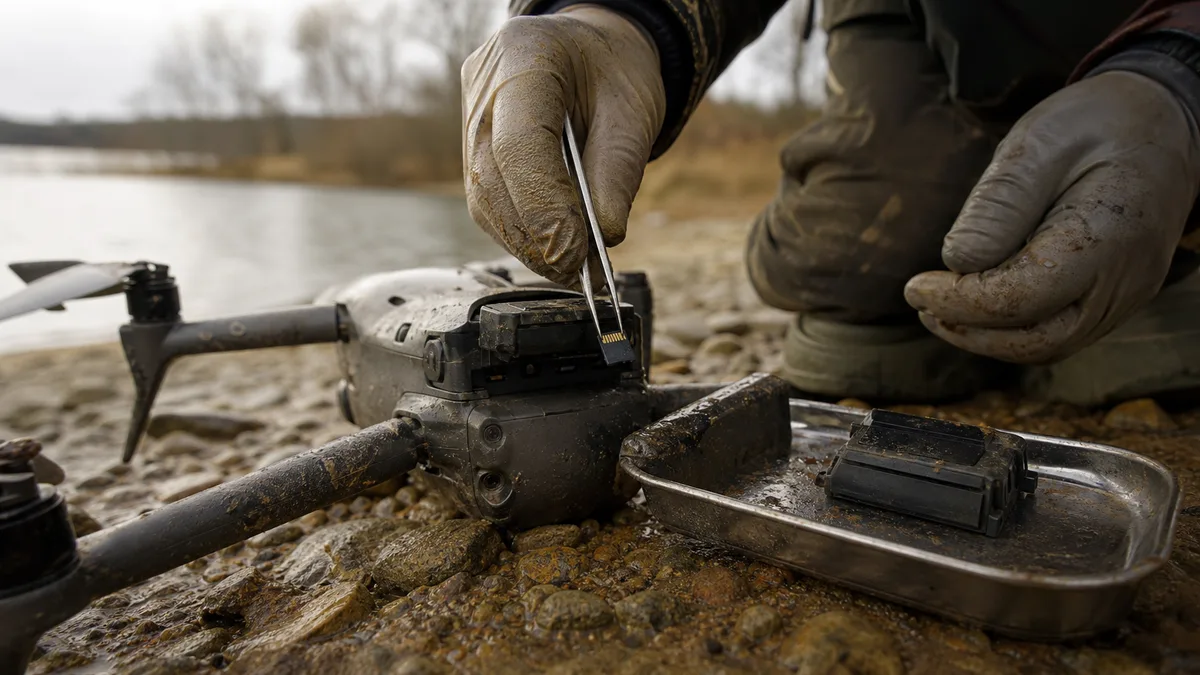
The short answer: After a crash or a water landing, do not power the drone back on and do not put the battery back in. Take out the microSD card, delete nothing from it, and do not let anything „repair" it — not the drone, not Windows. With a drowned drone, forget the hairdryer and the bag of rice; corrosion keeps eating the board until someone cleans it. Footage on the card can often be saved even when the last file refuses to play. The drone’s internal memory is soldered to the board, so after a serious accident the whole aircraft belongs in a lab, not on a charger.
A drone is a flying camera — and when it goes down, the owner is suddenly dealing with two separate problems: a machine worth thousands, and footage that exists nowhere else. A wedding shot from the air, a roof inspection for a client, holiday clips. In spring 2026 we handled an enquiry about recovering footage from a DJI Mini 5 Pro after a crash, and the scenario is always similar: the drone is in an undefined state, the owner has no idea whether it is safe to switch on, and the most valuable material is precisely that last flight — the one still recording at the moment of impact. This article covers what to do immediately, how a crash differs from a water landing, and when recovery has a realistic chance.
What to do immediately after the accident
The order of the steps matters more than speed:
- Take out the battery and never put it back in the drone. With a drowned drone this is also a safety measure — a LiPo cell that has been in water does not belong on a charger and is better left aside on a non-flammable surface.
- Do not power the drone on — not even „just to check" whether it comes back to life. A single power-up can burn out the board’s power circuitry, the very board the internal memory sits on.
- Take out the microSD card. It is the single most valuable item in the whole drone. Let it air-dry if it has been in water, and do not put it back.
- Do not format the card and do not delete anything — never confirm any prompt about repairing or formatting.
- Do not let the drone „repair" the last video. When it boots with a card inserted, DJI may offer to repair an interrupted recording. After an accident, that means writing to a card in an undefined state — and with a drowned drone, powering up corroded electronics on top of that.
- Write down exactly what happened: a fall onto a hard surface, fresh water, a muddy pond, how long the drone was submerged, and whether anyone switched it on afterwards.
That last point is not a formality. „It fell in a meadow and won’t switch on„ and „it sat in a pond for an hour" are two completely different cases with different procedures and a different risk in waiting.
Crash or water: two different cases
After a crash, the damage is usually mechanical: a cracked frame, a torn-off camera, a snapped arm. The electronics and the card often survive untouched. What matters is the interrupted write — the video being recorded at the moment of impact stays unfinished on the card and players refuse it. That is a solvable problem, as long as nobody keeps writing to the card.
After a water landing, time works against you. Water itself is not the worst enemy; what is dissolved in it is — mud, minerals, salt at the coast. Once there is electrolyte on the board and residual voltage, corrosion and electrolysis set in and carry on long after the drone comes out of the water. That is why drowned electronics are not dried, but cleaned. Full first aid for water-damaged equipment is covered in the article on a phone or drive after water damage — the same rules apply to a drone: no power, no charging, no hairdryer, no rice.
Drones add one specific hazard to a water landing: the battery. A damaged LiPo cell that has been in water is a fire risk and definitely should not go back into the drone for a „test". If the cell is swollen or warm, store it outdoors on a non-flammable surface until you hand it over.
Where a drone stores footage: microSD vs. internal memory
DJI drones record video primarily to the microSD card. When the card is missing, full, or the write fails, newer models record into internal memory — on the DJI Mini 5 Pro that means tens of gigabytes, so entire days of flying can end up there without the owner ever realising it.
The difference between the two storage locations is crucial for recovery:
- The microSD card comes out and is read on its own, regardless of the state of the drone. Even in a completely wrecked aircraft the card is usually readable — it is a small monolithic block that handles impact and water surprisingly well.
- Internal memory is a NAND chip soldered directly onto the drone’s board. No slot, no removal. When the drone will not power on, the route to the data runs through diagnostics and repair of the board’s power circuitry, or through reading the memory outside the drone. It is the same discipline as with soldered storage in laptops and phones — why reading NAND outside its original controller is difficult is explained in the article on SSD data recovery.
The practical consequence: if you were flying without a card or with a full one, do not write off a drone that shows no signs of life. Data in internal memory usually survives an accident the drone itself never recovers from — there just is no power button leading to it.
Why the last video won’t play
A video file is not finished the moment it is shot, but the moment the camera closes it properly. In the MP4 format, an index is written when the recording ends — the table that tells the player where each frame sits. When an impact or a power cut interrupts the write, that index is missing and the file looks damaged or empty, even though most of the data stream is still on the card.
Such a recording is reconstructed: the data stream is read off the card and the index is rebuilt, typically with the help of a reference video from the same drone at the same settings (resolution, frame rate, codec). The more was written to the card after the accident, the greater the risk that part of the stream has already been overwritten.
That is why two things are off limits:
- letting the drone „repair" the file — the repair works by writing to the card, and if it fails, it makes matters worse;
- trying one recovery program after another on the card and saving the results back to the same card.
The safe procedure is the same as with drives: a sector-by-sector image of the card first, all reconstruction done on the image, the original left untouched.
The card asks to be formatted or is not detected
The second typical situation: a card from the drone shows up on a computer with the message „You need to format the disk before you can use it". Don’t click. The message means the system found no usable file system structure — not that the footage is gone. The full decision procedure, including what you may try and what you may not, is described in the article on a drive asking to be formatted (RAW); it applies to a drone microSD without exception.
If not even the card reader detects it, or if it reports a nonsensical capacity, the card itself has most likely failed. A microSD is a monolith — controller and memory in a single moulded package — so it cannot be taken apart and „the chip read" the way larger media can. Reading is done through the technological contacts on the package and is only worth it when the data justifies the effort. It is definitely not a case for soldering at home.
When recovery has a chance
| Situation | What it means for recovery |
|---|---|
| Card readable, only the interrupted last recording missing | The best scenario. Rebuilding the video from an image of the card has a good chance. |
| Card asks to be formatted / reports RAW | Damaged structure, contents often intact. Do not format, do not repair. |
| Card not detected by any reader | Monolith failure. Handled by reading the NAND through the technological contacts. |
| Footage in internal memory, drone won’t power on | Board-level work: power diagnostics, corrosion cleaning, memory reading. |
| Drone left for a long time in salt or dirty water | Urgent. Corrosion progresses, but even after weeks it is not automatically too late. |
| Flying and recording continued after the accident | New writes overwrite the old footage. The odds drop with every minute recorded. |
| Card formatted after the accident and written over again | Overwritten sections cannot be reconstructed. |
The pattern is the same as with drives: the outcome is decided not by the brand of the drone, but by what happened to the media after the accident. Most cases are ruined not by the accident itself, but by the well-meant attempts that follow.
Diagnostics: find out first, decide after
For memory cards and ordinary media we offer free diagnostics on a no recovery — no fee basis — first you learn what is going on with the card, whether the footage can be reconstructed and what the recovery will cost, and only then do you decide. Data recovery starts at CZK 2,900 and depends on the type of fault, not on the capacity of the card.
Board-level work on a drone — typically footage in internal memory or after a water landing — means hands-on electronics work, so the procedure and the price are agreed after diagnostics and in advance, just as with phones. We never start work whose price you have not approved.
Bring to the lab:
- the whole drone, even if it looks hopeless (for the internal memory and reference footage);
- the microSD card — ideally exactly as it came out of the drone, with no further attempts;
- the battery separately if it has been in water (along with a note on its condition);
- a description of the accident: crash vs. water, type of water, time submerged, whether the drone was switched on afterwards;
- what the priority is — a specific flight, a specific job, everything.
How not to lose the footage next time
The card in a drone is not an archive. It is a working medium that flies with the drone — and crashes and drowns with it too.
After every day of flying, copy the footage off and only format the card in the drone once a copy exists elsewhere. For commercial flying (inspections, weddings, real estate) the multiple-copies rule pays off: one working copy, one on different media, one out of reach — how exactly to spread those copies out is described in the article on the 3-2-1 rule. And check the drone’s internal memory now and then; it often holds footage you know nothing about, which walks away with the drone when you sell it.
Frequently asked questions
The drone fell in water and I switched it on afterwards. Is it over?
Not necessarily, but don’t try again. If the power-up burned something out, it is usually the power section of the board — the memory chip often survives. Take out the battery and the card and have the condition assessed.
Can video be recovered from internal memory when the drone won’t power on?
Often yes. Internal memory is a chip on the board; if the power circuitry can be repaired or the memory read outside the drone, the data can be retrieved. An accident that grounds a drone for good does not automatically mean the memory is destroyed.
The card works, but the last flight is missing. Where is it?
Either the recording was left unfinished (a file with no index, which the player ignores), or it went into internal memory — because the card was full, for instance. Both can be verified; until then, do not write to the card.
Will a free video repair program help?
With a properly readable card and a single unfinished file, sometimes yes. What matters is working on an image of the card, saving the result elsewhere, and having a reference video from the same drone. If the card shows read errors or asks to be formatted, it belongs in diagnostics, not in experiments.
How much does drone data recovery cost?
For a card you will know after free diagnostics, in advance — recovery starts at CZK 2,900 and if nothing is recovered, you pay nothing. For board-level work on the drone (internal memory, water damage) we set the price after diagnostics and you approve it before we start. Get in touch via contact.