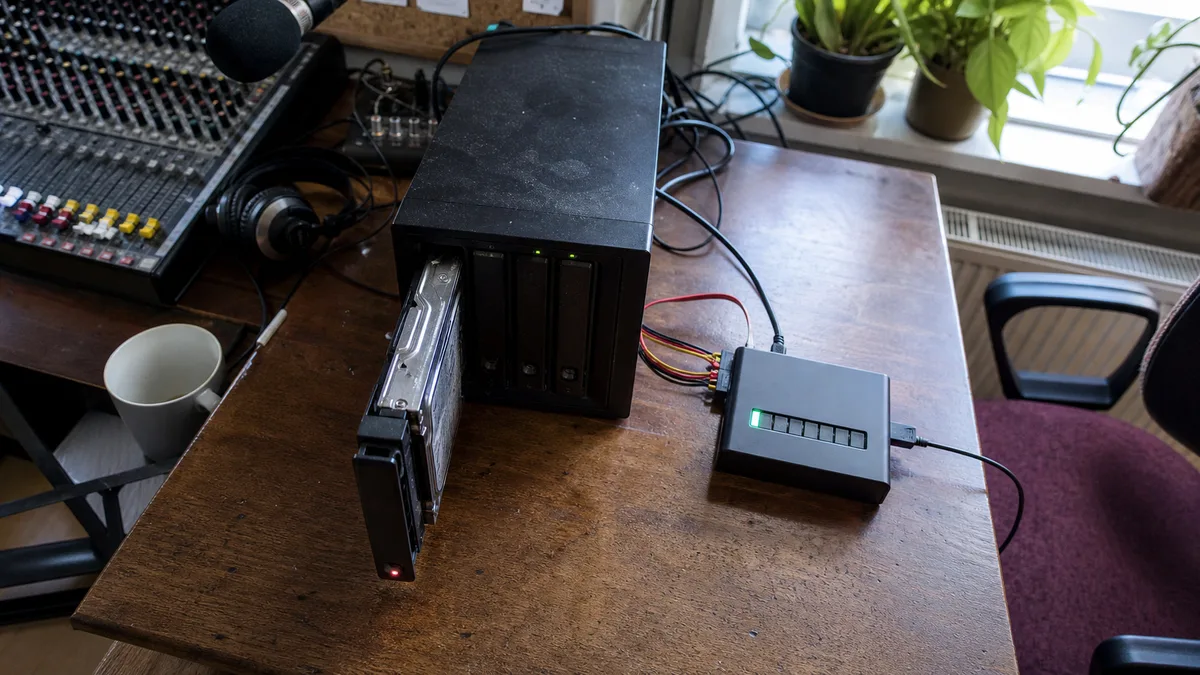
The short answer: A shingled magnetic recording (SMR) drive can accept roughly the first 20 to 50 GB of a rebuild at full speed, writing it to a conventionally recorded cache area. Once that fills up, it must rewrite entire bands of overlapping tracks in real time, and throughput drops from roughly 150 MB/s to just a few MB/s. RAID controllers and ZFS, however, allow only 8 to 20 seconds for a response. If the drive exceeds that limit, they report an error and eject it from the array. Because this may happen while the drive is updating its internal sector map, the „slow drive" can suddenly become a drive with a corrupted map that reports zero capacity. That is why SMR drives should not be used in an array—not because of their performance during normal operation.
How this failure differs from the usual one
A drive can drop out of an array for two completely different reasons, and they are frequently confused.
The first is a timeout mismatch: a desktop drive encounters a weak sector, becomes stuck in its internal read-retry process, and the array gives up waiting before the drive finishes. The drive itself may still be healthy and read normally after a restart. This is addressed by configuring ERC/TLER and is discussed in why a healthy drive drops out of a NAS.
The second involves shingled writes and behaves differently. It is not a single unreadable location; the drive simply can no longer keep up with the writes sent by the array. It is not stuck on a sector—it is busy managing itself. More importantly, while a drive usually survives a timeout mismatch without lasting consequences, this type of disconnection can permanently damage it. The general differences between the two recording technologies are explained in the overview of CMR and SMR technologies.
What happens inside the drive during a rebuild
An SMR drive has tracks that overlap like roof shingles, so it cannot rewrite one without affecting its neighbours. It works around this with a mechanism consisting of three parts:
- Media cache. A conventionally recorded area of the platter that receives incoming writes first. It is small, accounting for only a few percent of the drive’s capacity.
- Background housekeeping. When the drive is idle, it moves data from the media cache into the overlapping track bands.
- Translation map. To keep track of the current physical location of each sector, the drive maintains a table in its service area—module 190 on Western Digital drives. It changes during virtually every write.
During a rebuild, the drive receives a long, continuous stream of writes and gets no idle time for housekeeping. Rossmann Group describes the sequence as follows: the media cache absorbs the first 20 to 50 GB at full speed, then fills up. For every subsequent write, the drive must read an entire band, modify it, and write it back. Throughput drops from roughly 150 MB/s to just a few MB/s, while the drive’s processor prioritises its internal housekeeping over serving the host. Hardware controllers and ZFS both enforce command response limits of 8 to 20 seconds. If the drive exceeds the limit, the controller reports an IDNF (Sector ID Not Found) error and removes it from the array.
This is the critical point. The drive is disconnected in the middle of a translation map update, leaving the map only partially written. On higher-capacity drives, module 190 has no standard checksum because of its size, so partial corruption is not detected immediately—it becomes apparent only when the drive stops responding. The drive that was supposed to save the array suddenly becomes a data recovery case itself.
How much time it really takes
ServeTheHome measured this on a real array in May 2020: a four-drive RAIDZ array filled to roughly 60%, with additional network traffic during the resilver. Three conventional drives—the WD40EFRX, Seagate IronWolf ST4000VN008, and HGST 0F26902—completed the array rebuild in under seventeen hours. The shingled WD40EFAX took nearly 230 hours for the same task: nine days and fourteen hours. The test was repeated with a second drive to rule out operator error, with the same result.
Nine extra days are not merely an inconvenience. They mean nine days without parity, during which any further problem can cause data loss. Why rebuilding can destroy a RAID array explains why a rebuild is the most dangerous period in an array’s life.
For completeness, there is another side to the issue. In a corporate statement dated 23 June 2020, Western Digital said that during rebuilds on standard Synology or QNAP platforms—that is, without ZFS—its shingled drives perform comparably to conventional drives or slightly more slowly. At the same time, it acknowledged that continuous random writes during a ZFS resilver leave the drive no idle time for internal housekeeping, resulting in significantly lower performance—and recommended its own CMR product lines for such deployments. In other words, even the manufacturer says this type of drive does not belong in an array that must rebuild under load.
What the failure looks like when it happens
In a NAS, it does not begin with a „drive failed" message. Typical symptoms include:
- a rebuild stalled at a certain percentage while the estimated remaining time keeps increasing;
- a volume switching to degraded mode even after a new drive has been inserted;
- a drive being marked as faulty shortly after recovery begins, rather than after days of operation;
- a NAS that cannot shut down or restart properly because it is waiting for the drive.
When connected to a test bench, such a drive may report a nonsensical capacity according to Rossmann Group—0 B, 32 MB, or a fraction of its actual size. The partition table is missing, and although the drive appears in the BIOS, it never reaches the ready state in the operating system. It looks like an electronics failure, even though the platters, heads, and motor may all be intact and the data remains on the platters—the drive simply no longer knows where to find it. A separately documented wave of translation map failures affecting 2–6 TB WD Blue and WD Red models is described in WD SMR drive firmware failure.
When this happens, one rule must be followed because it can only be broken once: do not start a second rebuild. Another attempt will overwrite the remaining map data that could be used to reconstruct the original state. For the same reason, the drive is not powered on in a laboratory without hardware write protection. After startup, the firmware attempts to repair the map by itself, overwriting the very data needed for recovery.
How to identify an SMR drive before installing it
SMART cannot tell you: no attribute reports the recording technology. A short speed test will not reveal it either because the drive behaves normally until the media cache fills up. The only reliable option is to take the model number from the label or smartctl -i and compare it with the manufacturer’s table. A searchable overview covering multiple brands is available in how the model number reveals which drives do not belong in a NAS.
For NAS use, you only need to know two things. First, the suffix matters with WD Red drives: EFAX is shingled, while EFRX and EFPX (Red Plus) are conventional. Documented SMR models include the WD20EFAX, WD30EFAX, WD40EFAX, and WD60EFAX, with capacities from 2 to 6 TB—exactly the sizes most commonly purchased for home and business NAS systems. According to WD’s corporate statement from June 2020, Red Plus is the name used for conventional drives in the same family, while Red Pro also remains conventional.
Second—and this is a common trap with second-hand drives: the manufacturer’s official list is not proof. It describes the product range supplied at one particular point in time, not a complete historical catalogue. If a model is absent from the list, that does not automatically mean it is conventional; it means you need to check the datasheet for that specific model. „I checked the manufacturer’s list" is not sufficient evidence when evaluating a drive from a classified ad.
A trap unique to shingled drives: the TRIM command
This is a difference that does not need to be considered with conventional hard drives. TRIM—the command through which the system reports that deleted sectors are no longer needed—is almost exclusively associated with shingled hard drives.
On a conventional drive, a deleted file remains on the platter until something overwrites it, which is why it can often be recovered. On a shingled drive, TRIM immediately removes those sectors from the translation map. The drive then returns zeros to the system even though the data is still physically present on the platter—and background housekeeping soon overwrites it for good. The recovery window for deleted files is therefore dramatically shorter than on a conventional drive, and the drive itself closes that window regardless of what the user does.
That is why the first step when you suspect a problem is not „I’ll try recovery software," but disconnecting the drive. As long as the system keeps it connected, it can continue sending TRIM commands and writing to the journal.
If an SMR drive is already in the array
The right decision depends on the array’s current state.
| Array state | What to do |
|---|---|
| Running without errors, with no replacement planned | Do not start any additional operations—no scrub, benchmark, or bulk copying. Verify that you have a backup outside the array and that it can be restored. |
| Running, but you are planning a drive replacement or expansion | Buy a conventional drive and replace drives one at a time, with a pause between replacements. The process is described in expanding a NAS with larger drives. |
| The array is degraded, but the rebuild has not started | Do not begin by replacing the drive. First determine why it dropped out—for Synology, see Storage Pool Degraded and Volume Crashed. |
| The rebuild is running and stuck at one percentage point | Stop write-intensive tasks. If shared folders remain accessible, copy the data outside the array—see how to retrieve data from a NAS. |
| The drive has dropped out and reports a nonsensical capacity | Do not start a second rebuild or power on the drive. It needs professional diagnostics, not another trip back into the bay. |
Two rules apply in every case. Do not swap drives between bays—their order is part of the information that defines the array. And RAID is not a backup, even with dual parity; cases that reach a data recovery laboratory often involve RAID 6 with no independent copy. Recovering data from a RAID array explains what can be done after an array has already failed.
The aftermath
The controversy also had legal consequences. According to Tom’s Hardware, Western Digital proposed a $2.7 million settlement in June 2021, with payments of $4 to $7 per drive and no requirement to provide proof of purchase. The proposal also included an acknowledgement that shingled WD Red drives were unsuitable for NAS and RAID use.
For NAS owners, the useful lesson is not compensation but this: the product-line name on the label is not enough; the model number is what matters. A drive labelled WD Red may or may not be suitable for an array, depending on two letters in the middle of its model code.
Frequently asked questions
Can I leave an SMR drive in the array if everything is currently working?
As long as nothing changes, the array will continue to run. The problem arises during replacement or expansion—in other words, during a rebuild. Planned maintenance is more dangerous here than normal operation.
Would it help to run the rebuild overnight without any other load?
Partly—the drive gets more idle time for internal housekeeping. This does not increase the size of the media cache, however, and the continuous rebuild write stream will still fill it. The chance of completion improves, but there is no guarantee.
How can I tell whether the drive dropped out because of SMR rather than an ERC/TLER timeout?
Look at when it happened and how the drive behaves. A timeout mismatch appears during reading, and the drive returns to normal after a restart. A shingled drive typically fails during rebuild writes and often reports a nonsensical capacity after restarting.
Will changing the ERC/TLER settings solve the problem?
No. ERC reduces how long a drive spends trying to read a problematic sector. A shingled drive is not stuck reading—it cannot keep up with the writes, and changing a timeout cannot fix that.
Can data be recovered from a drive with a corrupted map?
Often, yes, because the mechanical components may be intact and the data remains on the platters. The key condition is that nothing else must be done with the drive: no second rebuild, no reconnecting it, and no recovery software.
Sources
- Rossmann Group, WD SMR Translator Failure Recovery (updated 14 May 2026) — https://rossmanngroup.com/problems/wd-smr-translator-failure
- ServeTheHome, WD Red SMR vs. CMR Tested Avoid Red SMR (28 May 2020) — https://www.servethehome.com/wd-red-smr-vs-cmr-tested-avoid-red-smr/
- Western Digital Corporate Blog, On WD Red NAS Drives (23 June 2020) — https://blog.westerndigital.com/wd-red-nas-drives/
- Tom’s Hardware, Western Digital to Settle SMR HDD False Advertising Class Action Lawsuit (17 June 2021) — https://www.tomshardware.com/news/wd-moves-to-settle-smr-hdd-false-advertising-class-action-lawsuit
Not sure whether your NAS contains shingled drives, or is your rebuild stuck at one percent? We can review your drive model list and logs before another recovery attempt begins—either as a one-off service or as part of our IT management for businesses and IT audit services. If the array no longer starts, the next step is RAID and NAS data recovery. Contact us through our contact page, by phone at +420 775 556 063, or by email at info@ithope.cz. For now, leave the drives in their bays and, above all, do not swap them—their order is crucial to recovery.
Where to find us
ITHOPE is a company based in Brno, Czechia: we do data recovery from disks, RAID and NAS, PC and laptop service and IT for business, all in our own lab at Viniční 3587/216, 615 00 Brno.
Phone +420 775 556 063 (24/7 line). You can bring the device in person, or send it by courier (Zásilkovna, PPL).